Networking & Content Delivery
Building Multi-Region Active-Active Architectures with CloudFront VPC origins and Advanced Routing
Introduction
Building a multi-region active-active architecture with Amazon CloudFront requires careful coordination of traffic routing to address performance, traffic management, and session consistency requirements, along with automated failover to maintain availability during regional events.
In November 2024, AWS released Amazon CloudFront VPC origins, which provides direct connectivity to private resources within your Amazon VPC without exposing them to the public internet. Your backend resources can remain fully private with no public IP addresses and no inbound internet paths to your origins while CloudFront handles advanced routing across regions at the edge.
This post shows how to implement three routing strategies at the CloudFront layer with automated failover for a multi-region active-active architecture with VPC origins. Using CloudFront Functions, you can implement geo-based routing, weighted routing, and session affinity routing to address performance, traffic management, and session consistency requirements.
Architecture Overview
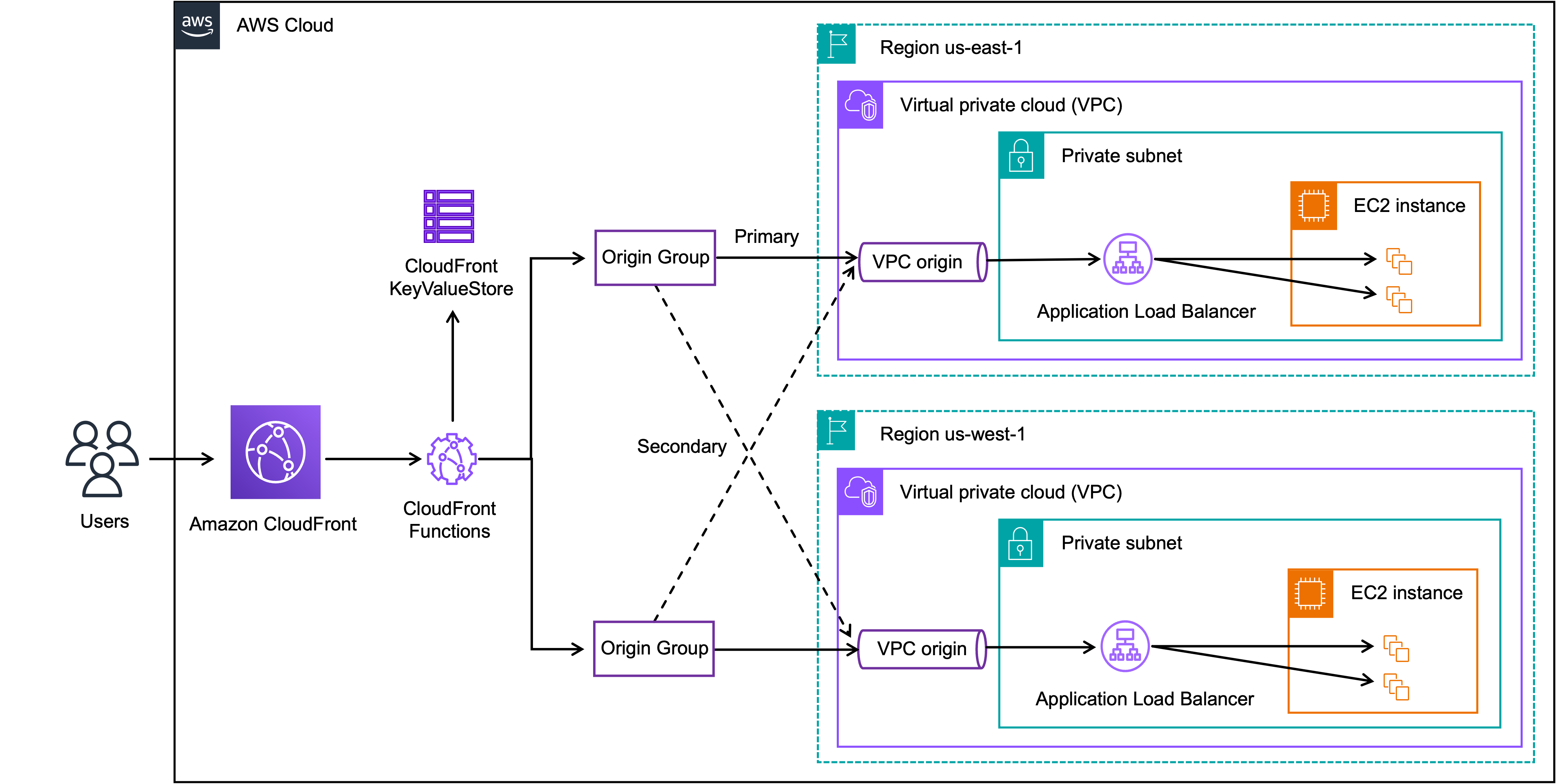
Figure 1. Multi-region active-active architecture overview with CloudFront VPC origins
Building a multi-region active-active architecture requires four foundational components of CloudFront that work together to deliver advanced routing and automated failover at the edge without exposing your origins to the public internet.
Amazon CloudFront VPC origins lets you connect directly to resources in your private subnets without exposing them to the public internet.
Origin Groups lets you provide automatic failover by defining primary and secondary origins for each region. When CloudFront detects a configured failover condition from the primary origin for GET, HEAD, and OPTIONS requests, it automatically retries the request against the secondary origin. Failover conditions include selectable status codes such as 400, 403, 404, 416, 429, 500, 502, 503, or 504, as well as connection errors and timeouts.
CloudFront Functions lets you execute custom logic at edge locations for advanced routing decisions.
CloudFront KeyValueStore (KVS) lets you externalize all routing configurations (such as traffic weights and feature flags) from your CloudFront Function code. With KVS, you can manage routing configurations in real time without redeploying your CloudFront Function.
Routing Strategies
Geo-Based Routing: Performance for a Global User Base
CloudFront’s edge network serves cached content from the nearest edge location. But for cache misses, the backend region matters. For example, a user on the US West Coast forwarded to us-east-1 incurs unnecessary cross-region latency on every origin fetch. Geo-based routing solves this by directing origin requests to the closest backend region.
To implement this, add a CloudFront-Viewer-Country-Region header to every request and configure a Viewer Request Function to automatically route the request to the nearest region based on the header.
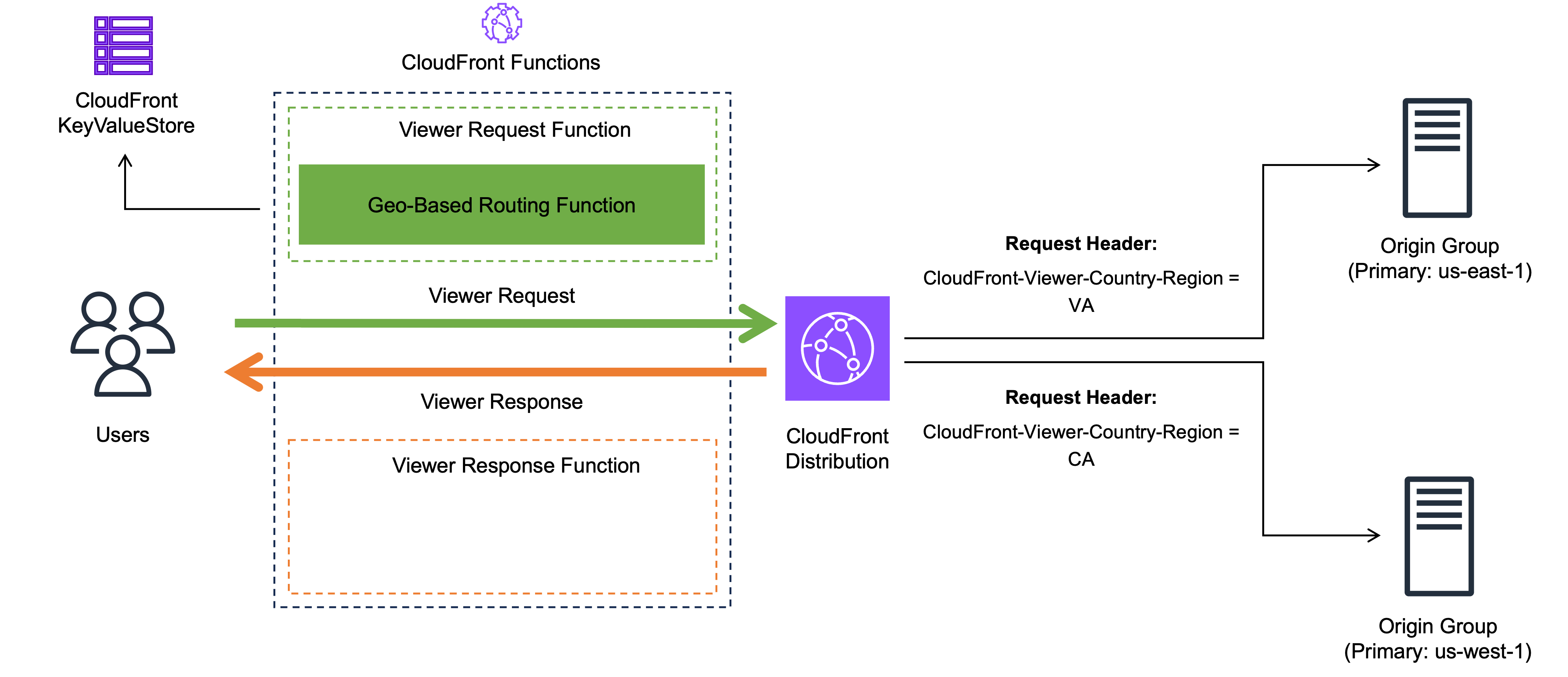
Figure 2. Multi-region active-active architecture with geo-based routing directing users to the nearest backend region
Weighted Routing: Operational Control
Weighted routing enables precise control over traffic distribution across regions. This solves operational challenges during gradual regional migrations, A/B testing, and capacity-based distribution.
Configure traffic weights in KVS and a Viewer Request Function that performs weighted random selection based on these configured weights. The weights are stored in KVS and can be adjusted in real-time without Viewer Request Function redeployment.
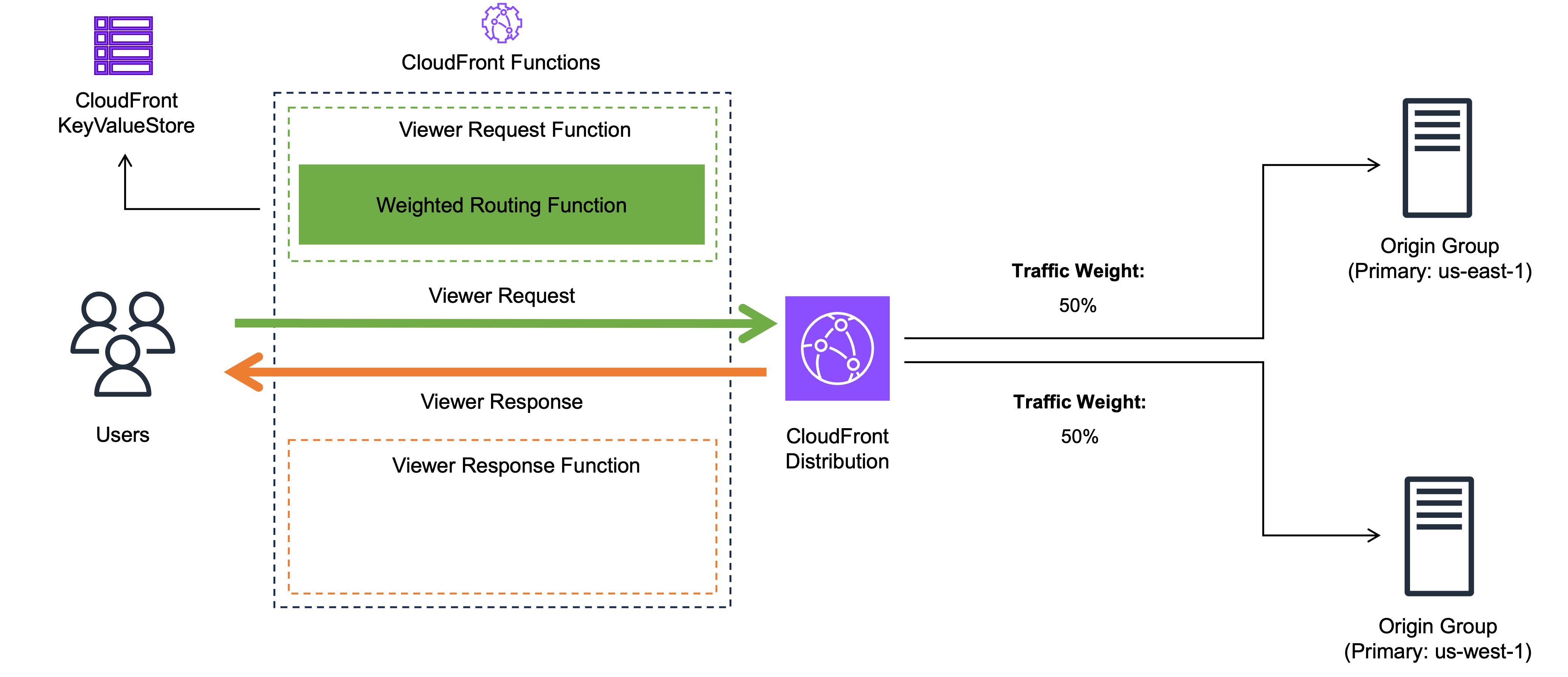
Figure 3. Multi-region active-active architecture with weighted routing distributing traffic across regions
Session Affinity Routing: Maintaining Session Persistence
In a multi-region setup, stateful applications require requests from the same user to reach the same backend to access server-side state. Additionally, if a user writes data in one region and their next request is routed to another region before replication completes, they read stale data.
To address this, pin a user’s session to a single region via a session affinity cookie. On the first request, the Viewer Request Function selects a region and stores it in a custom request header. The Viewer Response Function reads the custom request header and sets a session affinity cookie with the selected region. On subsequent requests, the Viewer Request Function reads the selected region from the session affinity cookie and routes to the pinned region
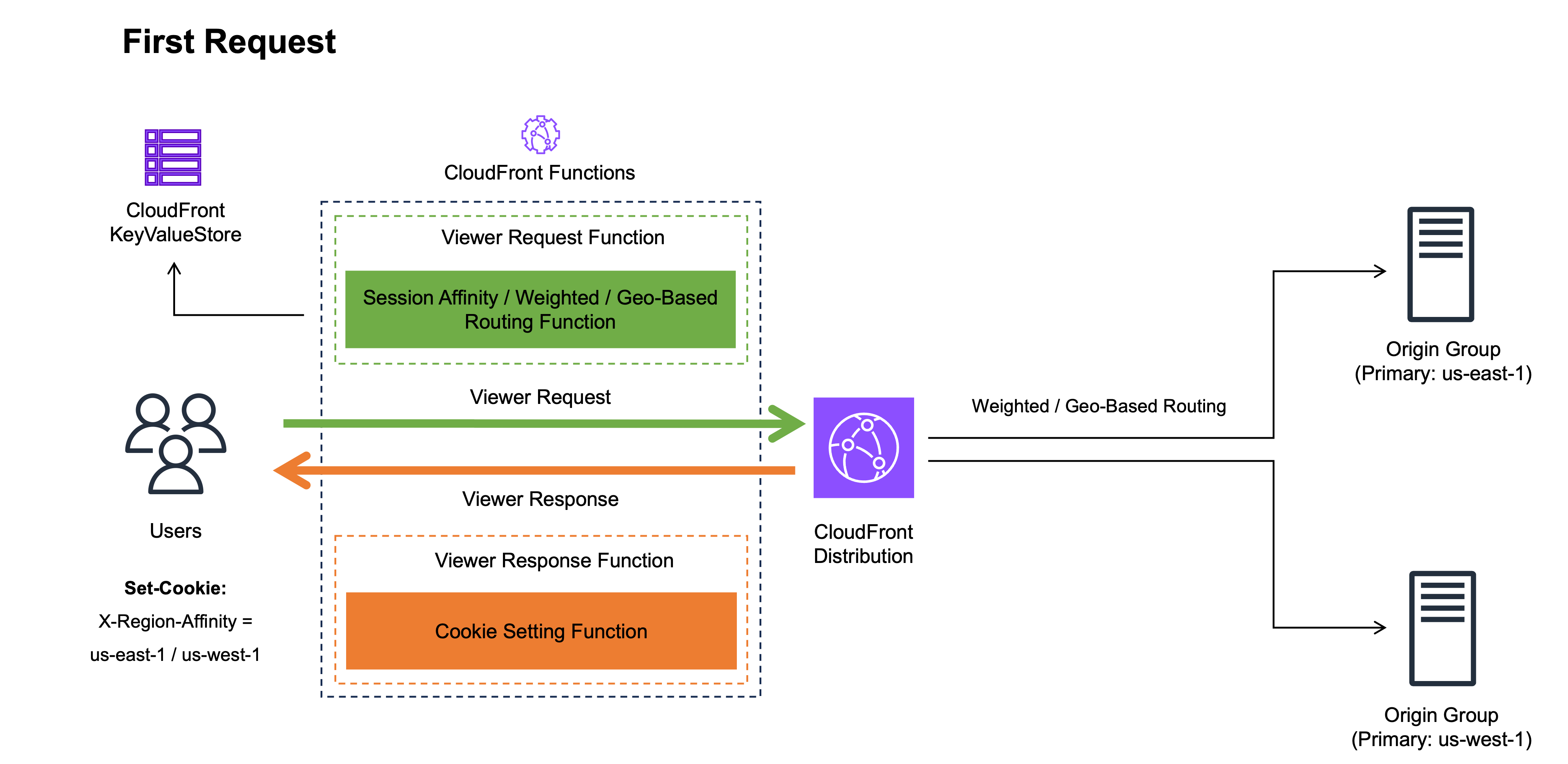
Figure 4. Session affinity routing first request, region selected and stored in a custom header and cookie
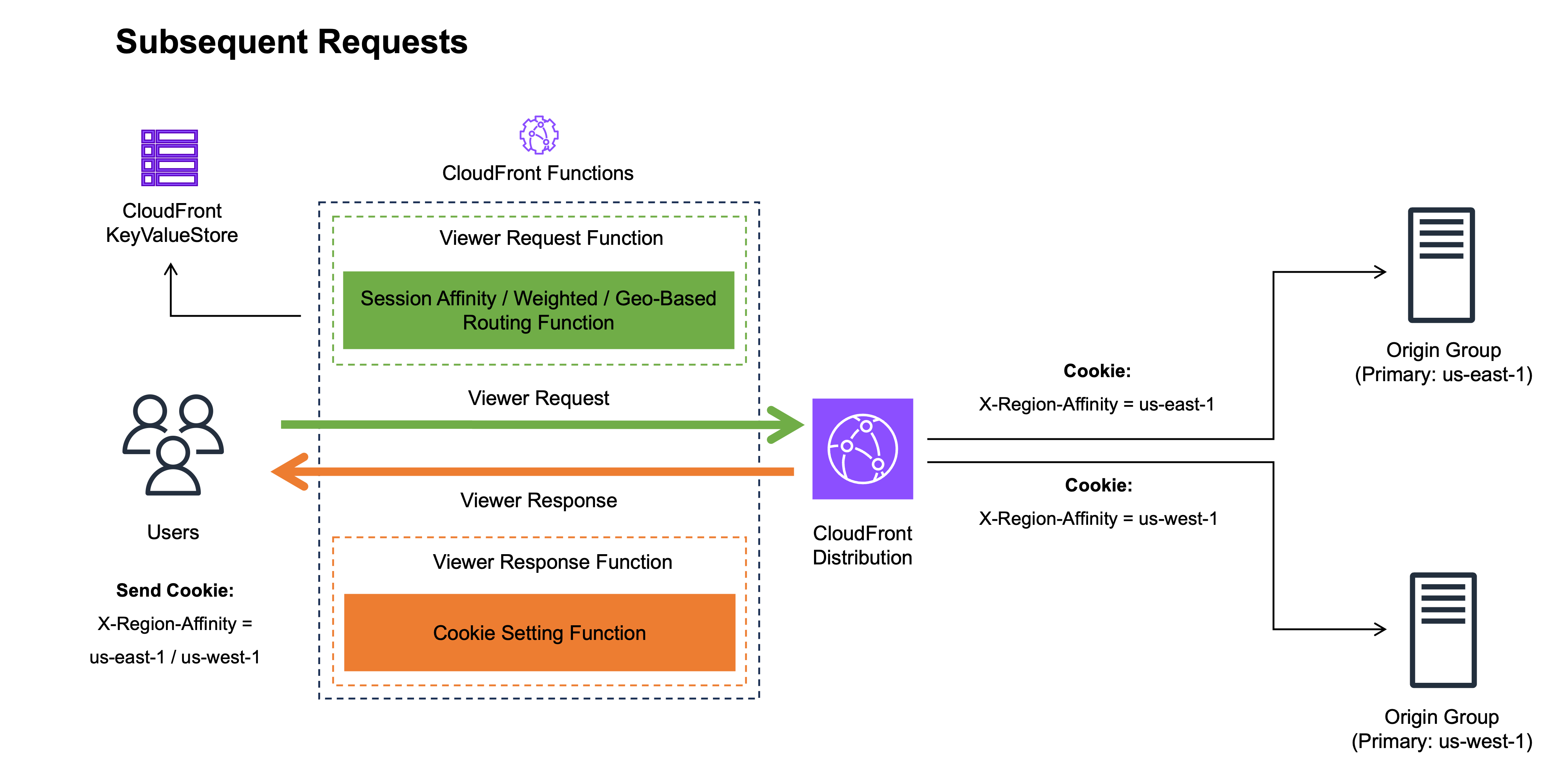
Figure 5. Session affinity routing subsequent requests, user pinned to previously assigned region via cookie
How the Routing Strategies Work Together
In practice, a production deployment combines all three strategies within a single Viewer Request Function that evaluates routing priority based on a feature flag stored in KVS:
Priority 1: Session Affinity Routing
If a session affinity cookie exists, route to the previously assigned region. No further evaluation occurs.
Priority 2: Weighted Routing (when enabled)
If no session affinity cookie exists and weighted routing is enabled, select a region based on configured weights.
Priority 3: Geo-Based Routing (default)
If no session affinity cookie exists and weighted routing is disabled, route based on the users geographic location.
Once a region is selected, session affinity pins subsequent requests until the cookie expires. Because session affinity takes highest priority, routing configuration changes in KVS only affect new sessions, providing gradual rollover without disrupting active users.
Session Affinity Cookie TTL Tradeoffs
The session affinity cookie TTL determines how long a user remains pinned to a region before the routing decision resets. When the cookie expires, the next request is evaluated as a new session under the current routing configuration. The following table summarizes common TTL configurations and their trade-offs between session consistency and operational flexibility.
| Session Affinity Cookie TTL | Benefit | Trade-Off |
| Shorter (for example, 1 hour) |
Faster rebalancing when routing configuration changes are applied | More frequent region switches may disrupt stateful sessions |
| Longer (for example, 7 days) |
Stronger session consistency | Slower rebalancing when routing configuration changes are applied |
| No Max-Age (browser session) |
Natural rebalancing when browser closes | Less predictable rebalance timing |
Note: Cookie-based session affinity has inherent limitations. It does not cover cross-device scenarios (where each device has its own cookie) or cases where the user clears cookies
Interaction with Origin Group Failover
The Viewer Request Function dynamically selects which Origin Group to use based on the region selected by the routing strategy (geo-based, weighted, or session affinity). The selected region serves as the primary origin with automatic failover to the secondary origin in a different region.
When the primary origin returns errors, CloudFront automatically retries against the secondary origin within the same Origin Group. However, failover only applies to GET, HEAD, and OPTIONS requests. CloudFront does not fail over POST, PUT, and DELETE requests.
Requests with session affinity continue routing to the Origin Group where the pinned region is the primary origin, even if it is returning errors. If an origin responds successfully but with high latency, failover will not trigger. Adjust the Origin connection and response timeout threshold so that slow origins are treated as failures.
Implementation Steps
The sample implementation covers the three routing strategies evaluated in the priority order described in previous section.
Step 0: Prerequisites
Before starting the setup, verify the following prerequisites are met:
- CloudFront Distribution
- An internet gateway attached to each VPC that contains your VPC origin resources
- Two internal Application Load Balancers (ALBs), one per region, deployed as VPC origins
- A default Origin Group with the two VPC origins configured as Primary and Secondary
- The sample code cloned to your local repository: https://github.com/aws-samples/sample-cloudfront-vpc-origins-multi-region-routing
Step 1: Create CloudFront KeyValueStore configuration
1. Upload kvs-config.json from the sample repository to an Amazon S3 bucket as shown below in Figure 7. In this post, you upload a JSON file and specify the S3 URI when creating the KeyValueStore. Alternatively, key-value pairs can be added directly from the CloudFront KeyValueStore console.
{
    "data": [
        {
            "key": "session-affinity-routing",
            "value": {
                "ttl": 86400
            }
        },
        {
            "key": "weighted-routing",
            "value": {
                "enabled": false,
                "weights": {
                    "us-east-1": 50,
                    "us-west-1": 50
                }
            }
        },
        {
            "key": "geo-based-routing",
            "value": {
                "default": "us-east-1",
                "VA": "us-east-1",
                "CA": "us-west-1"
            }
        }
    ]
}
Figure 6. JSON configuration file defining session affinity routing, weighted routing, and geo-based routing settings for KVS
Note: Escape characters in “value” fields are omitted for readability
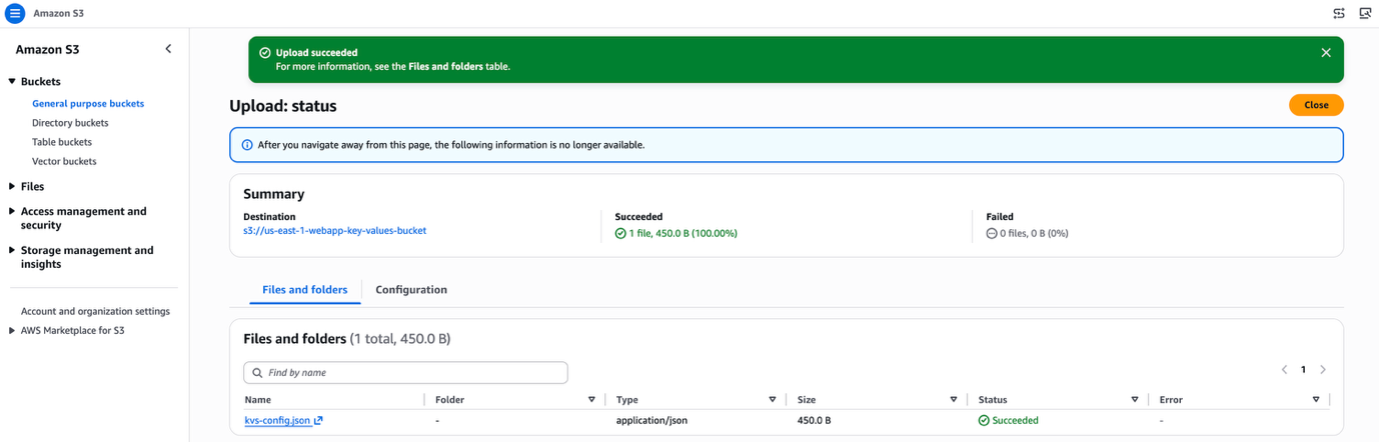
Figure 7. Uploading the routing configuration JSON file to an Amazon S3 bucket
2. Open the Amazon CloudFront console, navigate to Functions, and select the KeyValueStores tab. Click Create KeyValueStore, enter the name, specify the S3 URI of the JSON file, and click Create as shown below in Figure 8.
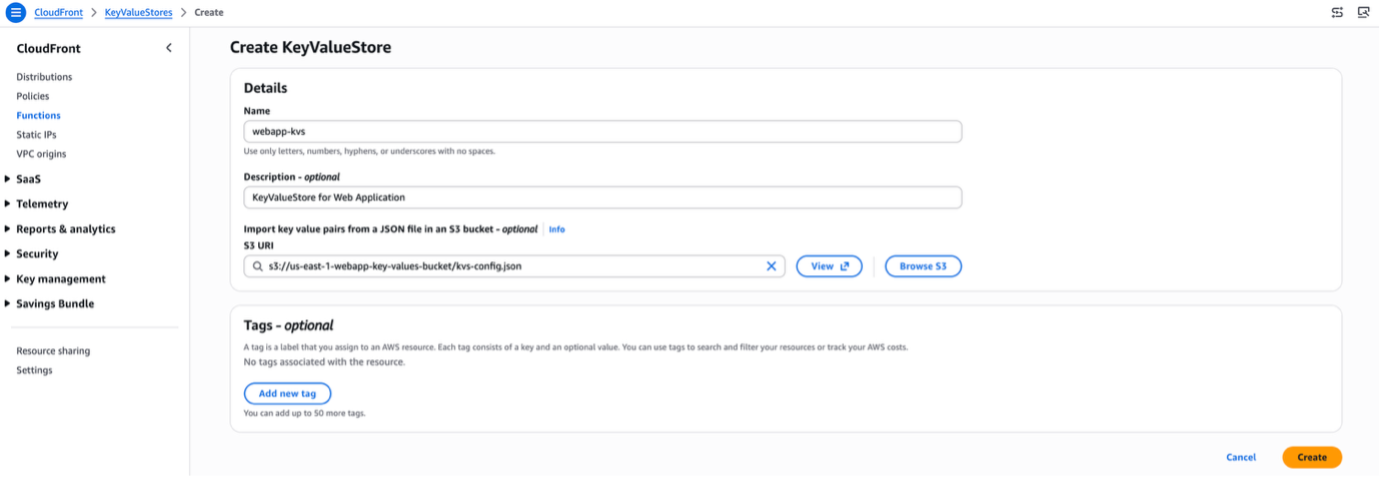
Figure 8. Creating a CloudFront KeyValueStore with the S3 URI of the routing configuration JSON file
3. Confirm the KeyValueStore has been created. The Last modified field initially displays “Provisioning” and changes to a timestamp once available, as shown below in Figure 9.
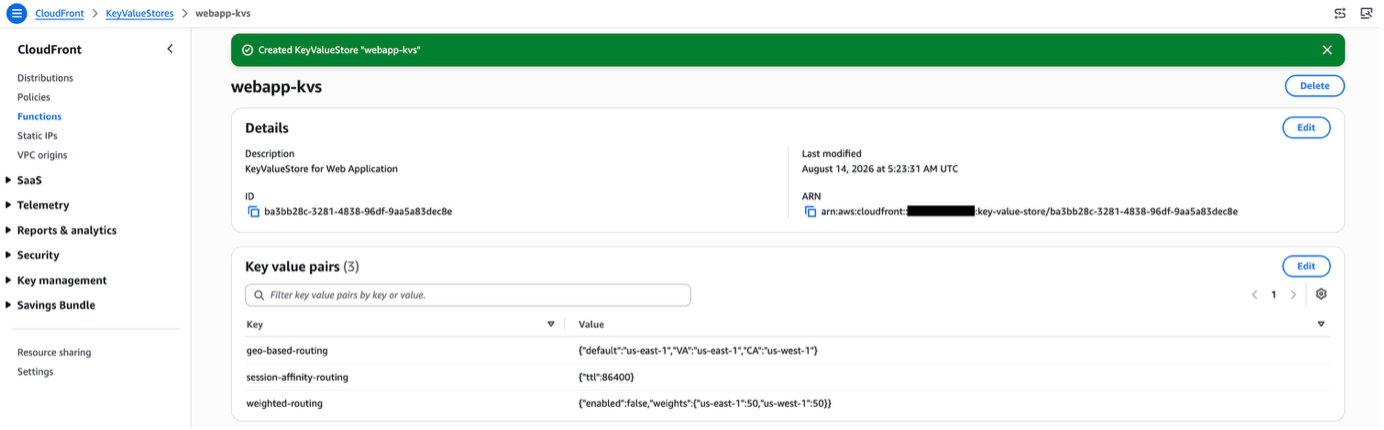 Figure 9. Confirming successful CloudFront KeyValueStore deployment with updated Last Modified timestamp
Step 2: Create CloudFront Policy
1. Open the Amazon CloudFront console, navigate to Policies, and select the Origin request tab. Click Create origin request policy, include CloudFront-Viewer-Country-Region as a header as shown below in Figure 10, and click Create.
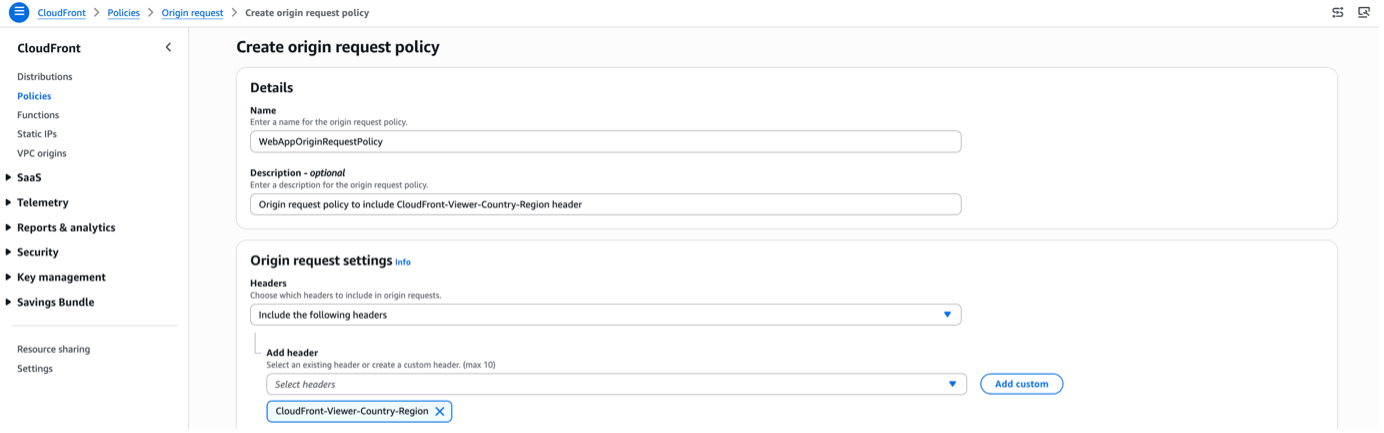 Figure 10. Creating an origin request policy that includes the CloudFront-Viewer-Country-Region header
2. Confirm the origin request policy is created, as shown below in Figure 11.
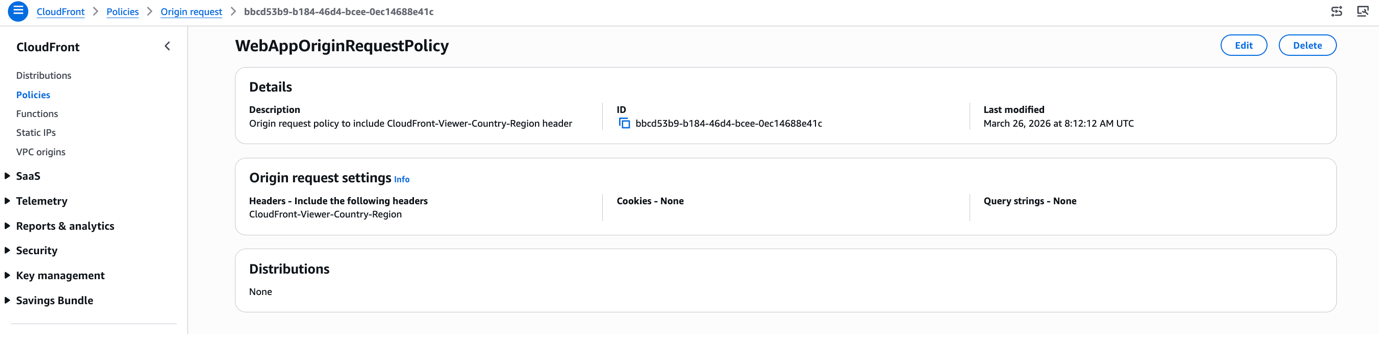
Figure 11. Confirming the custom origin request policy has been successfully created
Step 3: Create CloudFront Functions
1. Open the Amazon CloudFront console and navigate to Functions. Click Create function, enter the function name, specify the JavaScript version, and click Create function as shown below in Figure 12.
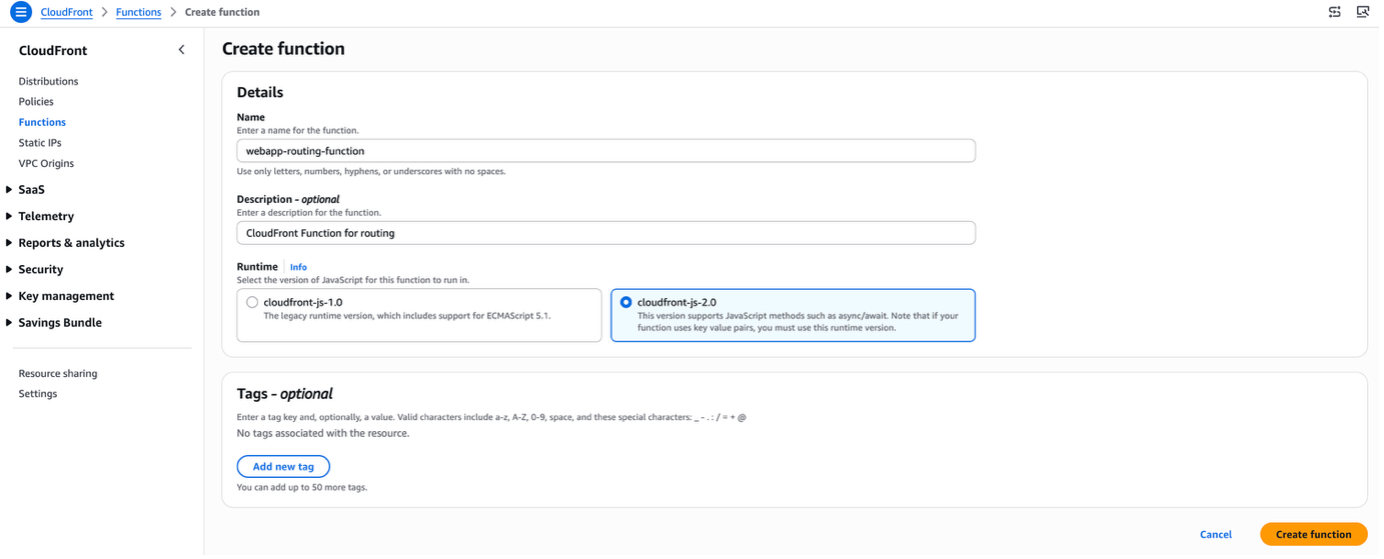 Figure 12. Creating a new CloudFront Function with a specified name and JavaScript runtime version
2. Associate the KeyValueStore to the function by clicking Associate existing KeyValueStore, selecting the KeyValueStore you created, and clicking Associate KeyValueStore as shown below in Figure 13.
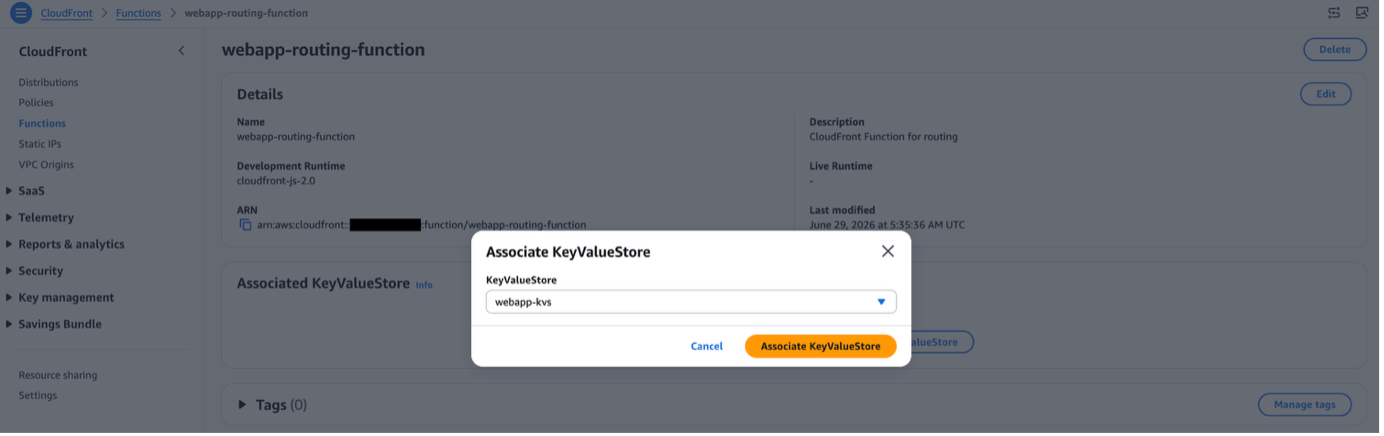 Figure 13. Associating the CloudFront KeyValueStore to the CloudFront Function
3. Create the Viewer Request Function using the sample code from viewer-request-routing-function.js in the sample repository. This function performs session affinity, weighted, and geo-based routing. It defines two Origin Groups, one per region, with the origin order swapped so that each region can serve as the primary. Based on the region selected by the routing strategy, the function calls cf.createRequestOriginGroup() with the corresponding Origin Group where the selected region’s origin is listed first as the primary.
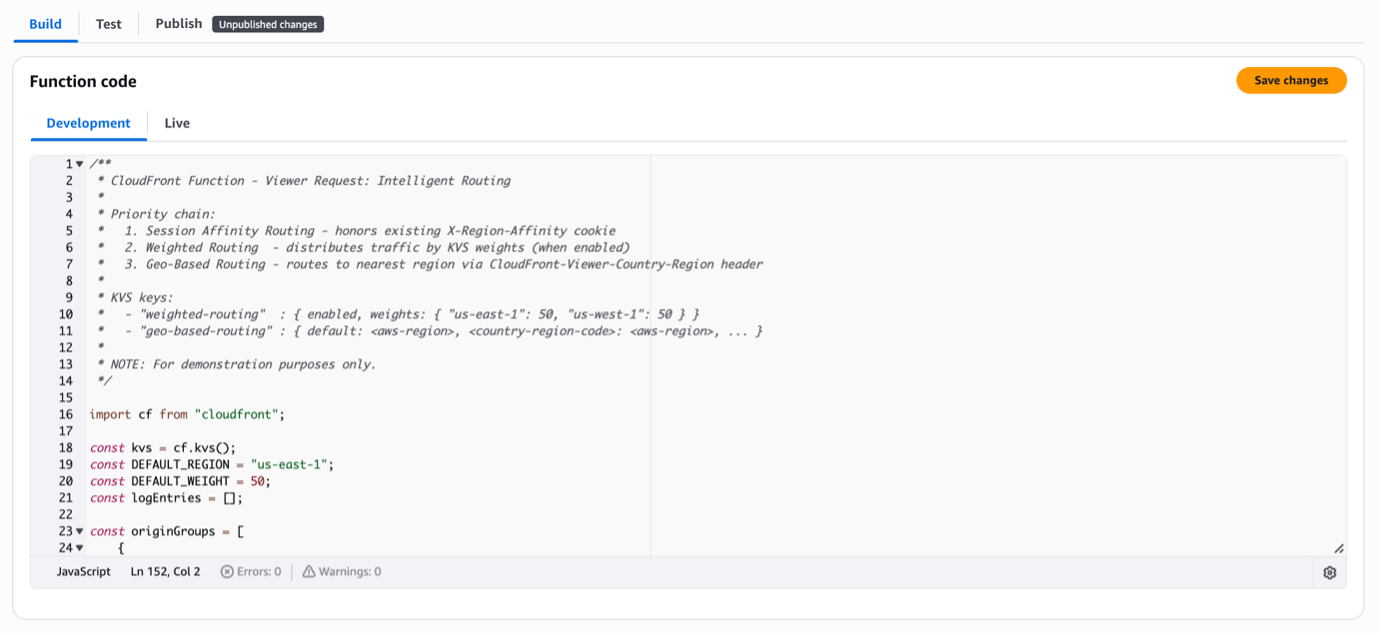 Figure 14. Viewer Request Function sample code implementing session affinity, weighted, and geo-based routing logic
Note: This source code is only a sample and is not intended for use in production environments
4. Publish the function by selecting the Publish tab and clicking Publish function, as shown below in Figure 15.
 Figure 15. Publishing the CloudFront Function from the Publish tab
5. Create the Viewer Response Function using the sample code from viewer-response-cookie-function.js in the sample repository. This function sets the session affinity cookie. Follow Step 3.1–3.4 above.
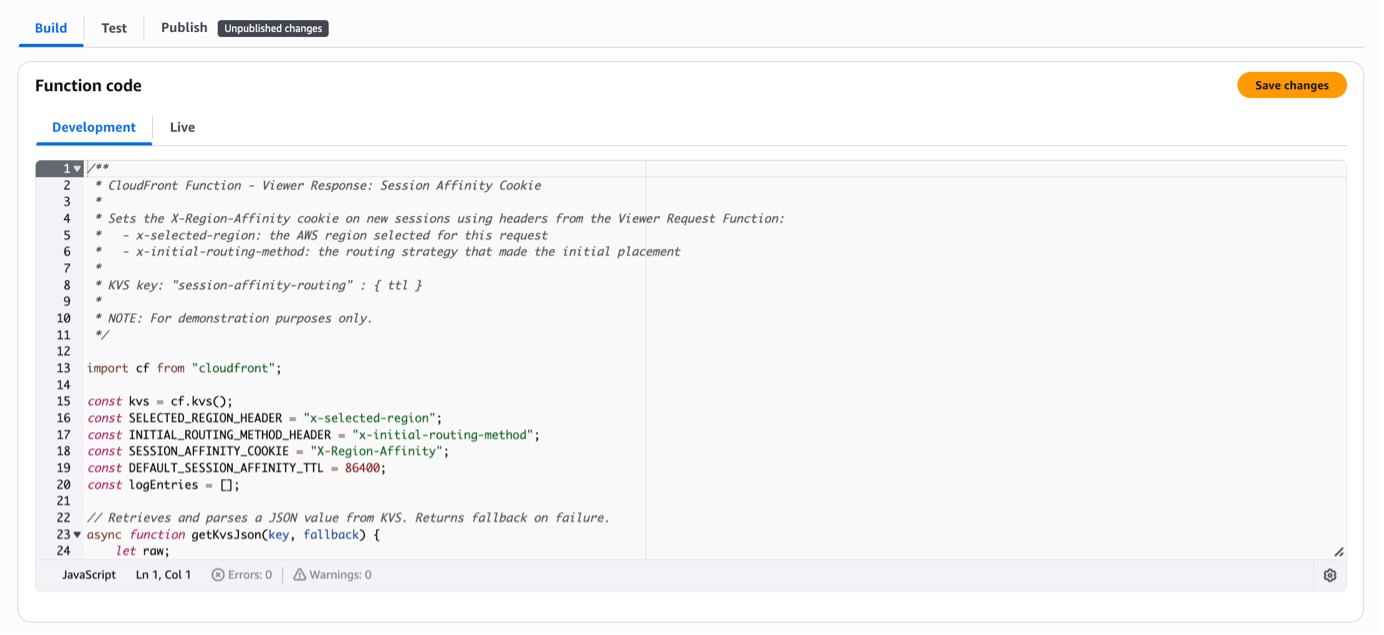 Figure 16. Viewer Response Function sample code that sets the session affinity cookie based on the selected region
Note: This source code is only a sample and is not intended for use in production environments
6. Confirm both functions are published. The Status changes from “Development” to “Published”, as shown below in Figure 17.
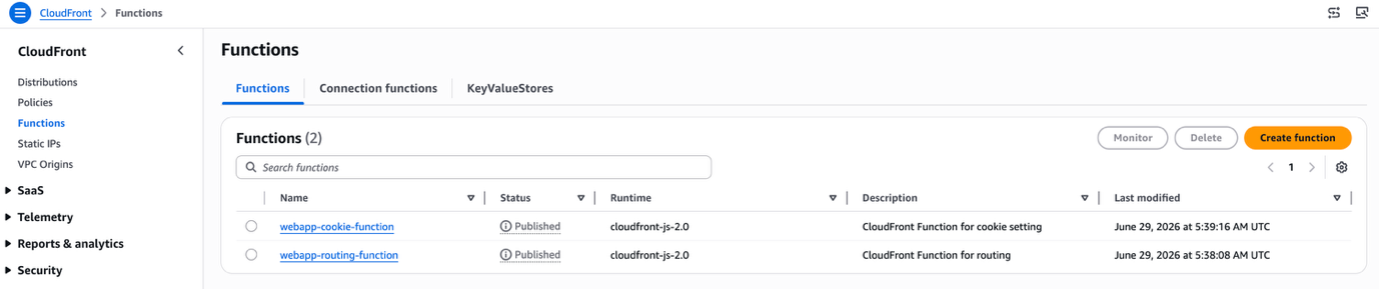 Figure 17. Confirming both Viewer Request and Viewer Response Functions are published successfully
Step 4: Create Behavior
1. Open the Amazon CloudFront console, select Distributions, then select the applicable distribution. Select the Behaviors tab and click Create Behavior. Enter the path pattern and specify the default origin group, as shown below in Figure 18.
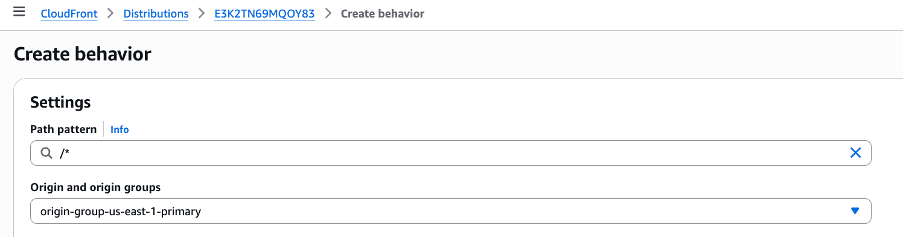 Figure 18. Creating a CloudFront behavior with a path pattern and the default origin group specified
2. Select the origin request policy you created, as shown below in Figure 19.
 Figure 19. Selecting the custom origin request policy within the CloudFront behavior configuration
3. In the Function associations section, select CloudFront Functions as the function type, then select the functions you created earlier for Viewer request and Viewer response. Click Create behavior, as shown below in Figure 20.
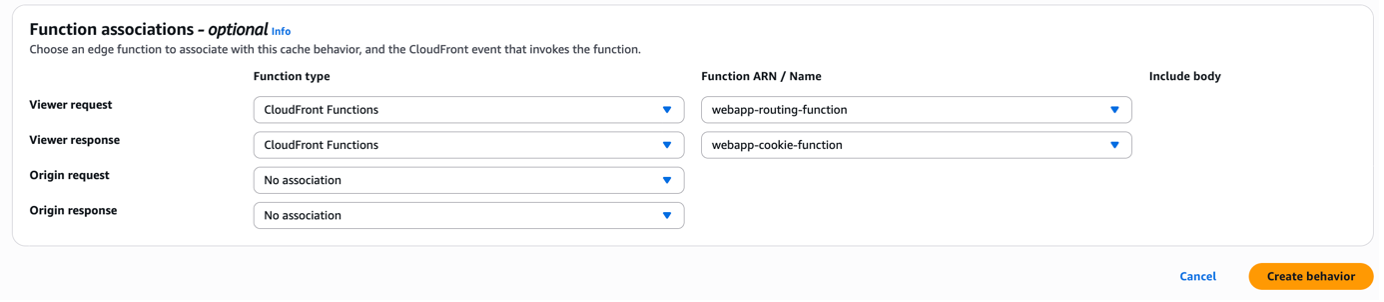 Figure 20. Associating Viewer Request and Viewer Response CloudFront Functions to the behavior
Step 5: Test Sample
1. Edit the behavior and select CachingDisabled as the cache policy, as shown below in Figure 21. This disables caching to confirm traffic is being distributed to the expected region.
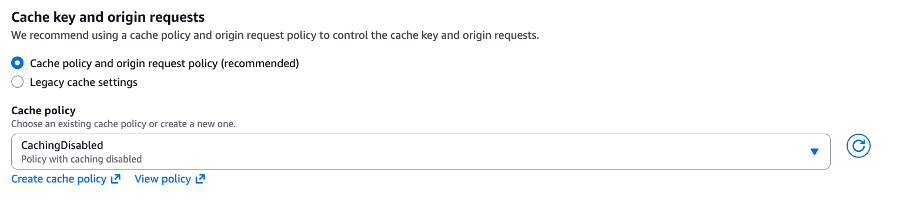 Figure 21. Selecting CachingDisabled cache policy on the behavior to validate routing during testing
2. Make a request to the CloudFront domain multiple times from a client in us-east-1 and us-west-1 to confirm traffic is routed to the closest region, as shown below in Figure 22 and Figure 23.
$ echo ""; for i in `seq 1 5`; do echo "Request [$i]"; curl <your-distribution-id>.cloudfront.net; echo ""; echo ""; done

Request [1]
<!DOCTYPE html>
<html>
<h1>index.html delivered from us-east-1 VPC origin</h1>
</html>

Request [2]
<!DOCTYPE html>
<html>
<h1>index.html delivered from us-east-1 VPC origin</h1>
</html>

Request [3]
<!DOCTYPE html>
<html>
<h1>index.html delivered from us-east-1 VPC origin</h1>
</html>

Request [4]
<!DOCTYPE html>
<html>
<h1>index.html delivered from us-east-1 VPC origin</h1>
</html>

Request [5]
<!DOCTYPE html>
<html>
<h1>index.html delivered from us-east-1 VPC origin</h1>
</html>
Figure 22. Curl output confirming geo-based routing directs all requests to us-east-1 from a us-east-1 client
$ echo ""; for i in `seq 1 5`; do echo "Request [$i]"; curl <your-distribution-id>.cloudfront.net; echo ""; echo ""; done

Request [1]
<!DOCTYPE html>
<html>
<h1>index.html delivered from us-west-1 VPC origin</h1>
</html>

Request [2]
<!DOCTYPE html>
<html>
<h1>index.html delivered from us-west-1 VPC origin</h1>
</html>

Request [3]
<!DOCTYPE html>
<html>
<h1>index.html delivered from us-west-1 VPC origin</h1>
</html>

Request [4]
<!DOCTYPE html>
<html>
<h1>index.html delivered from us-west-1 VPC origin</h1>
</html>

Request [5]
<!DOCTYPE html>
<html>
<h1>index.html delivered from us-west-1 VPC origin</h1>
</html>
Figure 23. Curl output confirming geo-based routing directs all requests to us-west-1 from a us-west-1 client
3. Set the enabled field to true in the weighted-routing KVS key. Make a request to the CloudFront domain multiple times to confirm traffic is distributed to both regions, as shown below in Figure 24.
$ echo ""; for i in `seq 1 5`; do echo "Request [$i]"; curl <your-distribution-id>.cloudfront.net; echo ""; echo ""; done

Request [1]
<!DOCTYPE html>
<html>
<h1>index.html delivered from us-west-1 VPC origin</h1>
</html>

Request [2]
<!DOCTYPE html>
<html>
<h1>index.html delivered from us-east-1 VPC origin</h1>
</html>

Request [3]
<!DOCTYPE html>
<html>
<h1>index.html delivered from us-west-1 VPC origin</h1>
</html>

Request [4]
<!DOCTYPE html>
<html>
<h1>index.html delivered from us-east-1 VPC origin</h1>
</html>

Request [5]
<!DOCTYPE html>
<html>
<h1>index.html delivered from us-west-1 VPC origin</h1>
</html>
Figure 24. Curl output confirming weighted routing distributes requests across both us-east-1 and us-west-1 regions
4. Make a request to the CloudFront domain multiple times from a client browser to confirm traffic is routed to a single region via session affinity, as shown below in Figure 25 and Figure 26.
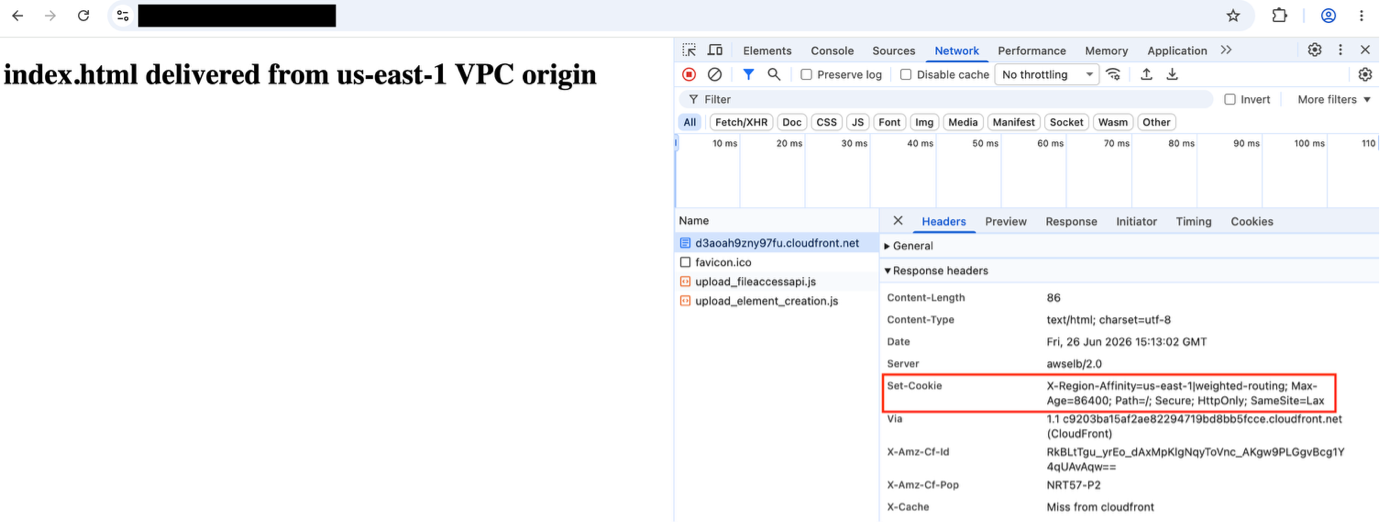 Figure 25. First browser request routed to a region with session affinity cookie set in the response
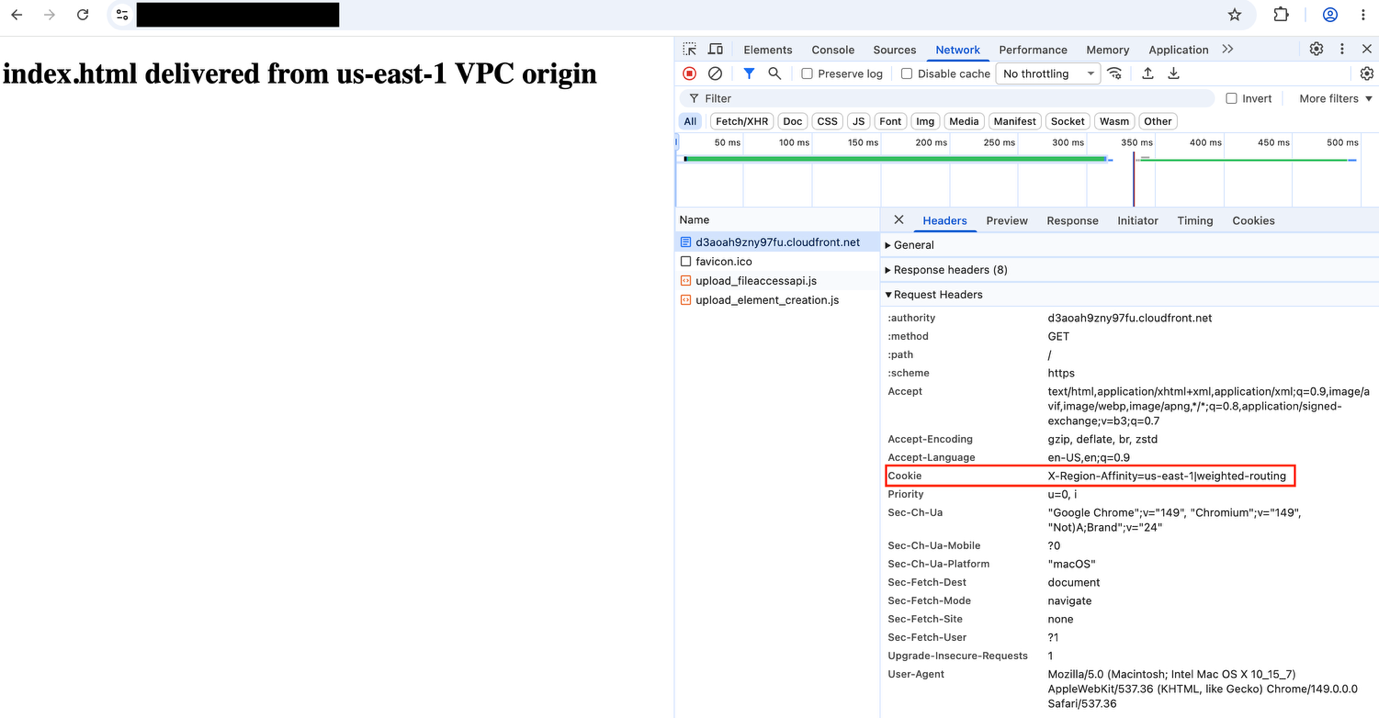 Figure 26. Second browser request confirming session affinity pins traffic to the same region as the first request
5. Delete the session affinity cookie from the browser and make a request to the CloudFront domain to confirm traffic is no longer pinned to a single region, as shown below in Figure 27.
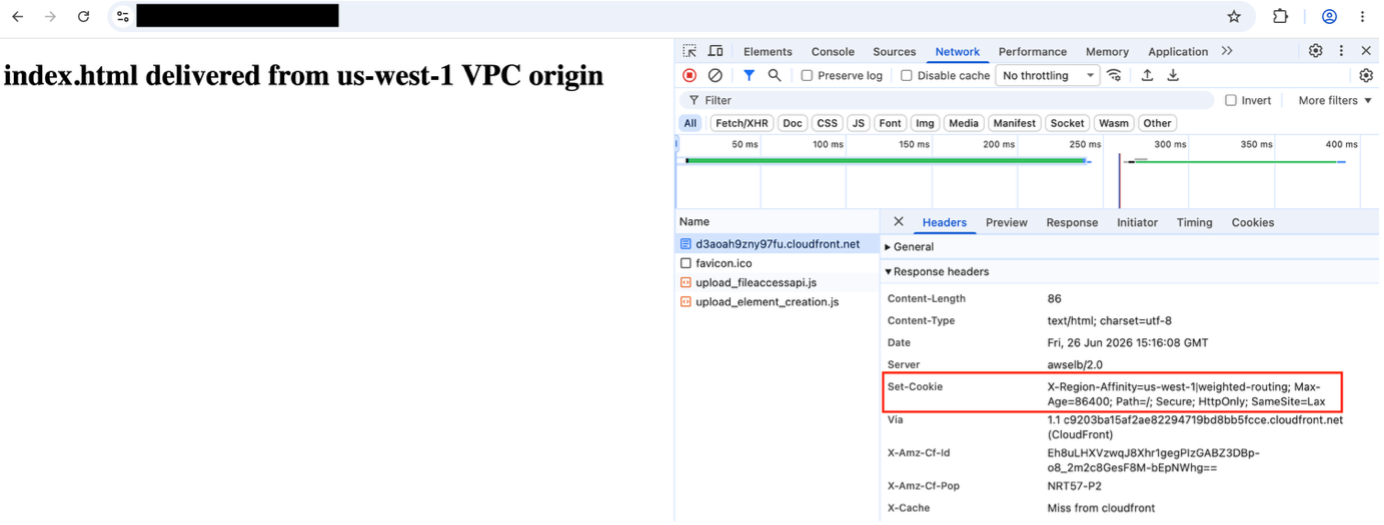 Figure 27. Browser request after cookie deletion confirming session affinity is no longer applied
6. Open the Amazon CloudFront console, navigate to Functions, and select the KeyValueStores tab. Select the KeyValueStore, click Edit in the Key value pairs section, change the weight values for the regions, and click Save changes, as shown below in Figure 28.
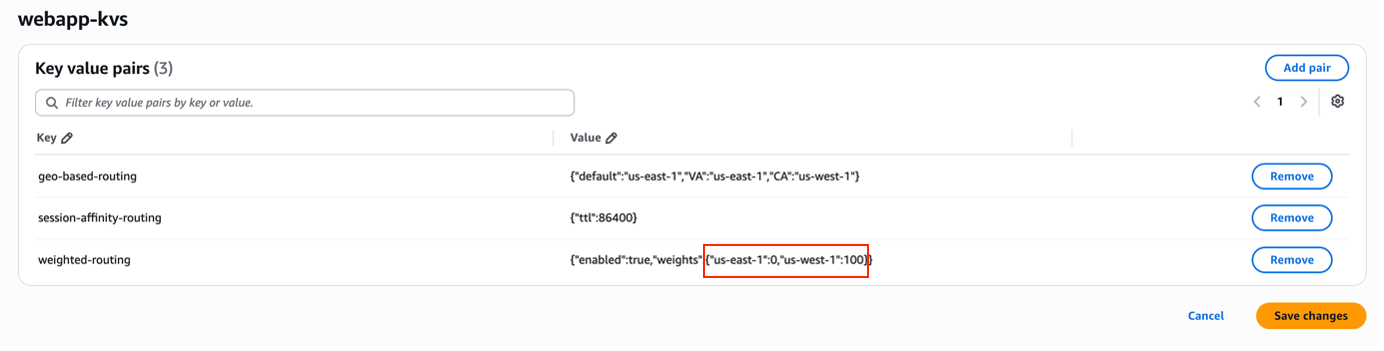
Figure 28. Updating regional traffic weight values in the CloudFront KeyValueStore console
7. Make multiple requests to the CloudFront domain and verify the weight changes are reflected, as shown below in Figure 29.
$ echo ""; for i in `seq 1 5`; do echo "Request [$i]"; curl <your-distribution-id>.cloudfront.net; echo ""; echo ""; done

Request [1]
<!DOCTYPE html>
<html>
<h1>index.html delivered from us-west-1 VPC origin</h1>
</html>

Request [2]
<!DOCTYPE html>
<html>
<h1>index.html delivered from us-west-1 VPC origin</h1>
</html>

Request [3]
<!DOCTYPE html>
<html>
<h1>index.html delivered from us-west-1 VPC origin</h1>
</html>

Request [4]
<!DOCTYPE html>
<html>
<h1>index.html delivered from us-west-1 VPC origin</h1>
</html>

Request [5]
<!DOCTYPE html>
<html>
<h1>index.html delivered from us-west-1 VPC origin</h1>
</html>
Figure 29. Curl output confirming all traffic routes to us-west-1 after setting us-east-1 weight to 0 and us-west-1 weight to 100
8. Open the Amazon EC2 console and select Return fixed response as the default action for the ALB listener in us-west-1 configured as a VPC origin. Set the response code to 500, as shown below in Figure 30.
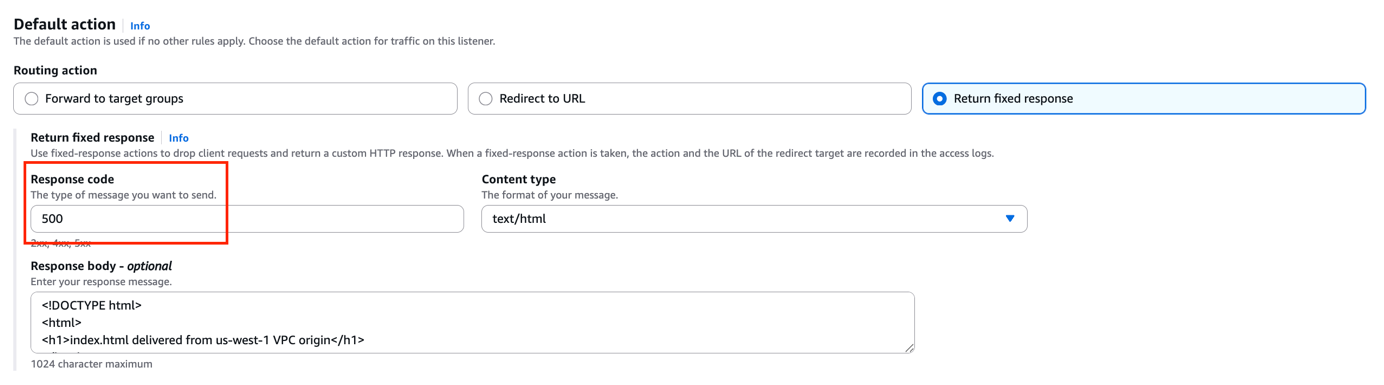 Figure 30. Configuring the us-west-1 ALB listener to return a fixed 500 error response to simulate origin failure
9. Make multiple requests to the CloudFront domain and verify failover to the secondary VPC origin in us-east-1, as shown below in Figure 31.
$ echo ""; for i in `seq 1 5`; do echo "Request [$i]"; curl <your-distribution-id>.cloudfront.net; echo ""; echo ""; done

Request [1]
<!DOCTYPE html>
<html>
<h1>index.html delivered from us-east-1 VPC origin</h1>
</html>

Request [2]
<!DOCTYPE html>
<html>
<h1>index.html delivered from us-east-1 VPC origin</h1>
</html>

Request [3]
<!DOCTYPE html>
<html>
<h1>index.html delivered from us-east-1 VPC origin</h1>
</html>

Request [4]
<!DOCTYPE html>
<html>
<h1>index.html delivered from us-east-1 VPC origin</h1>
</html>

Request [5]
<!DOCTYPE html>
<html>
<h1>index.html delivered from us-east-1 VPC origin</h1>
</html
Figure 31. Curl output confirming Origin Group failover routes all requests to us-east-1 after us-west-1 returns 500 errors
Cleanup
To avoid ongoing charges, delete the following resources if they are no longer needed:
- CloudFront Function associations and functions
- CloudFront KeyValueStore
- Custom Origin Request Policy
- VPC origins
- CloudFront distribution (disable first, then delete after propagation completes)
Note: Disabling a distribution may take several minutes before deletion is allowed
Monitoring
CloudFront Functions can emit custom log data into real-time access logs using cf.logCustomData() helper method. This solution uses this to write routing decision metadata (selected routing method, target region, session cookie state) into each access log record. Operators can then correlate request outcomes with the underlying routing decisions in a single log query without joining separate log sources. For per-request granularity, enable real-time access logs, which are delivered within seconds via Amazon Kinesis Data Streams. These logs expose key diagnostic fields: r-host (serving origin), sr-reason (failover trigger), origin-fbl (first byte latency), and origin-lbl (last byte latency).
Real-time logs incur charges for CloudFront log delivery and Kinesis Data Streams, and any downstream services such as Amazon Data Firehose and Amazon S3. To control costs, reduce the sampling rate (1-100%) or scope the configuration to specific behaviors.
Routing decisions, failover, and function execution all happen at the edge, making failures difficult to detect and diagnose without targeted observability. The following table defines three operational scenarios to monitor. Each scenario pairs an Amazon CloudWatch alarm for detection with appropriate log sources for investigation.
| Scenario | CloudWatch Alarm Trigger (Detect) |
Logs (Investigate) |
What it tells you |
| Routing Strategy Change | AWS CloudTrail events for KVS key-value pair updates | Real-time access logs enriched with CloudFront Functions logs via cf.logCustomData() |
Whether routing decisions match intent and requests reach the expected region |
| Origin Failover | (Same as above) | Whether failover is triggering and the secondary origin is serving requests | |
| CloudFront Function Errors |
|
Whether routing and session affinity cookie functions are executing successfully |
Routing Strategy Change
Set a CloudWatch Alarm on CloudTrail events for KVS updates to detect configuration changes. The routing metadata emitted by CloudFront Functions appears in the viewer-request-log-data and viewer-response-log-data fields. Operators can use these fields to confirm routing decisions such as the routing method applied, target region, target origin, and whether a session affinity cookie was set. In addition, correlating this metadata with the r-host field confirms whether the actual serving origin matches the intended routing decision.

Figure 32. Real-time access log output showing routing metadata when geo-based routing is applied

Figure 33. Real-time access log output showing routing metadata when weighted routing is applied

Figure 34. Real-time access log output showing routing metadata when session affinity routing is applied
Origin Failover
Set a CloudWatch Alarm on 4xxErrorRate and 5xxErrorRate. If it remains low during a regional event, failover is active. Query real-time access logs where sr-reason indicates whether failover occurred and r-host confirms which origin served each request.

Figure 35. Real-time access log output confirming Origin Group failover with sr-reason and r-host fields
If an origin responds with high latency but successful status codes, failover will not trigger. Check origin-fbl and origin-lbl to identify the slow origin, and adjust the Origin connection and response timeout threshold so that slow origins are treated as failures.

Figure 36. Real-time access log output showing origin-fbl and origin-lbl latency fields for slow origin detection
CloudFront Function Errors
Set CloudWatch Alarms on FunctionExecutionErrors, FunctionValidationErrors, FunctionComputeUtilization, and FunctionThrottles. If elevated, requests may bypass custom routing entirely. For handled errors (KVS lookup failure, JSON parse error) that can impact routing decisions, check real-time access logs for the specific error emitted by cf.logCustomData() to correlate with request outcomes. Also use console.log() at critical checkpoints for debugging and consider a debug mode switch to enable logging only when further investigation is required.

Figure 37. Real-time access log output showing a KVS lookup failure error emitted by the CloudFront Function
Conclusion
This post demonstrates how to implement three routing strategies at the CloudFront layer with automated failover for a multi-region active-active architecture using VPC origins. Using CloudFront Functions, you can reduce origin latency with geo-based routing, distribute traffic flexibly with weighted routing, and maintain session consistency with session affinity routing. With both regions actively serving traffic, Origin Group failover provides an additional safety net by automatically routing read requests to a healthy secondary region when needed, reducing single points of failure during regional events.