AWS for Games Blog
Protecting game servers from DDoS attacks with Amazon GameLift Servers
Distributed denial of service (DDoS) attacks against game servers are common if you operate a popular online game, and the motivations vary. A frustrated player might want to force an opponent offline to win a match. A losing player might want to prevent a defeat from being recorded in their stats. Some attackers only want to prove they can. Whatever the reason, the result is the same: a flood of unwanted traffic aimed at your game servers, intended to overwhelm them and disrupt play.
The impact lands directly on your players. Matches stutter, sessions drop, and players in the targeted game session suffer. The impact is typically even wider, affecting players in other game sessions located on the same instance as the target. Even a short disruption erodes the trust you’ve worked hard to build, and frustrated players are quick to share a bad experience. That makes DDoS Protection a player-retention concern, not only an infrastructure one.
In this post, I walk you through the two DDoS Protection options provided with Amazon GameLift Servers: Enhanced DDoS Protection and Player Gateway. You will learn how each option works, the tradeoffs between them, and how to adopt them for your game.
Common approaches to DDoS mitigation
Before looking at what Amazon GameLift Servers offers, it helps to understand the techniques the industry commonly relies on and why they can be insufficient for real-time games.
The first is reactive filtering. By using reactive filtering, a system can detect an attack in progress and apply traffic filters in response. This can be effective, but it’s inherently a step behind; by the time you’ve detected the attack, characterized it, and deployed a filter, players have already felt the disruption. Attacks that shift their signature can keep you chasing the problem.
The second is firewalls, both instance-local and edge-based. Firewalls are a valuable layer, but maintaining accurate rules across a large, dynamic fleet is operationally expensive. Edge-based scrubbing services add cost, and rules tuned too aggressively risk dropping legitimate player traffic along with the attack.
The common gap in these approaches is that they struggle to tell a real player apart from an attacker. Game traffic is typically User Datagram Protocol (UDP), connectionless, and high frequency, which makes indiscriminate filtering an imprecise method.
DDoS Protection options with Amazon GameLift Servers
Historically, fleets running on Amazon GameLift Servers have benefited from AWS Shield Standard, which automatically detects and mitigates the most common network and transport layer (layers 3 and 4) attacks at no additional cost. This is a valuable baseline that helps keep your instances from being taken offline by common floods. However, note that an instance can absorb far more traffic than a game server can process without players noticing. So, during a sustained attack, gameplay might degrade before Shield Standard responds. Building on that foundation, Amazon GameLift Servers now offers two options that you can choose based on how much protection your game needs and how much integration effort you want to expend:
- Enhanced DDoS Protection, which is automatic and requires no integration work.
- Player Gateway, which offers stronger, traffic-aware protection in exchange for a small integration effort.
Both are available at no cost and are fully managed. Let’s look at each in turn.
Enhanced DDoS Protection
Enhanced DDoS Protection rate limits inbound traffic to your game servers, keeping a flood of packets from overwhelming them. It also integrates with AWS Shield to further limit traffic from known hostile sources, drawing on threat intelligence so that recognized threat actors are filtered before they reach your fleet.
The biggest advantage of Enhanced DDoS Protection is that it requires zero effort to adopt. It’s enabled by default on Amazon GameLift Servers and works proactively. For many games, this is a sensible default layer of defense.
The tradeoff is that Enhanced DDoS Protection can’t tell legitimate game traffic from attack traffic. Under a determined attack, the Shield integration filters traffic from known hostile sources, dropping recognized attackers at a much higher rate than your players. But because there’s no way to validate that a given packet came from a real player, any remaining attack traffic that isn’t tied to a known bad source is rate-limited alongside legitimate traffic in the same proportion. As a result, players on heavily targeted game sessions might still see some level of disruption. As the next section shows, that’s a very different outcome than having no protection at all. Figure 1 helps illustrate the effect.
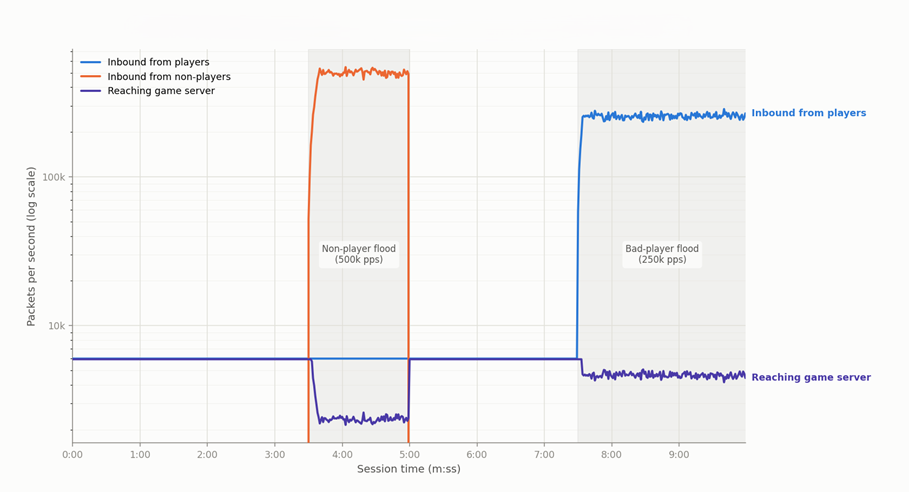
Figure 1: Impact of DDoS attacks on a game session protected by Enhanced DDoS Protection
Figure 1 shows the impact of two types of attacks on a hypothetical game session. This 10-minute game session has 100 players, each sending 60 packets per second (pps). Two attacks are present in this scenario. Between 3:30 and 5:00, a flood of invalid packets is sent to the server with a volume of 500,000k pps. From 7:30 until the end of the game, a single misbehaving player sends 100,000 pps instead of the usual 60. Because the system has no knowledge of what player traffic looks like, this results in indiscriminate packet shedding above the system’s configured threshold during both attacks. This example uses 200,000 pps as the maximum allowed pps per instance (this example is for illustrative purposes and the actual threshold can vary).
Because there’s still impact to player traffic even with Enhanced DDoS Protection, you might wonder what the benefit is. Without this protection, the game server would receive the entire over 500,000 pps of the larger attack. This could be enough to render the game server unresponsive, or perhaps crash the instance completely, stopping the attacked game session and any others running on the same instance.
With Enhanced DDoS Protection enabled, your game server only sees a packet volume that it’s capable of processing. You might still see some degree of packet loss, but traffic is kept low enough that your game server can keep up, which is sufficient for many games. Note that the preceding example is intentionally a worst-case scenario to make the impacts more visible. In practice, a traffic flood will typically contain some portion that can be identified by other means as malicious. Such traffic can be shed prior to shaping remaining traffic to manageable levels. The shedding of more known-bad traffic means that less legitimate traffic is subject to indiscriminate drops.
Player Gateway
The biggest shortcoming of Enhanced DDoS Protection is the inability to identify legitimate player traffic. To address that, Player Gateway takes a more targeted approach. Instead of sending player traffic directly to your game servers, traffic flows through a layer of UDP proxies that sit in front of the fleet. These proxies are used to validate and scrub traffic before it gets to your game servers.
Each player is issued an access token, which the client prepends to the payload of every packet it sends. The proxies validate this token and rate limit on a per-token basis before forwarding traffic to the game server. The per-token rate limiting prevents one player from overwhelming your game server with traffic and guards against replay-style attacks. Because the proxies can distinguish valid game traffic from attack traffic, traffic shaping becomes far more targeted than the indiscriminate filtering of a rate-limit-only approach. The token is stripped off by the proxies, so your game server sees normal traffic and needs no server-side changes. Even as a player is moved between proxy endpoints, their traffic always reaches your game server from a single, consistent source.
Player Gateway also changes what an attacker can see. Clients never learn the actual endpoint of the game server, only the proxies they’ve been assigned. There’s no direct path to target the game server; all traffic must pass through the proxies first. Players are assigned different proxies at random, so other players in the same game are very likely connected through different proxies. If one player launches an attack against the endpoints they know about, that attack is filtered by the proxies before it reaches the game server. The other players in the match are on entirely different proxies, so they keep playing unaffected. Proxies are quick and inexpensive to replace, and affected players can keep communicating over their other assigned endpoints while one under attack is swapped out.
With Player Gateway in place, the system can differentiate valid game traffic from attack traffic, attacks are contained to the proxies rather than the game servers, and players are isolated from one another’s attackers. Figure 2 shows the same types of attacks as in the previous example and allows us to make two observations.
- The non-player flood is identified as invalid traffic and completely dropped before hitting the game server.
- No valid player traffic is dropped except for excess packets from the attacking player, which has been throttled to the allowed per-player threshold. This means that the game has been protected from having to deal with excess traffic while also avoiding the need to shed valid player traffic.
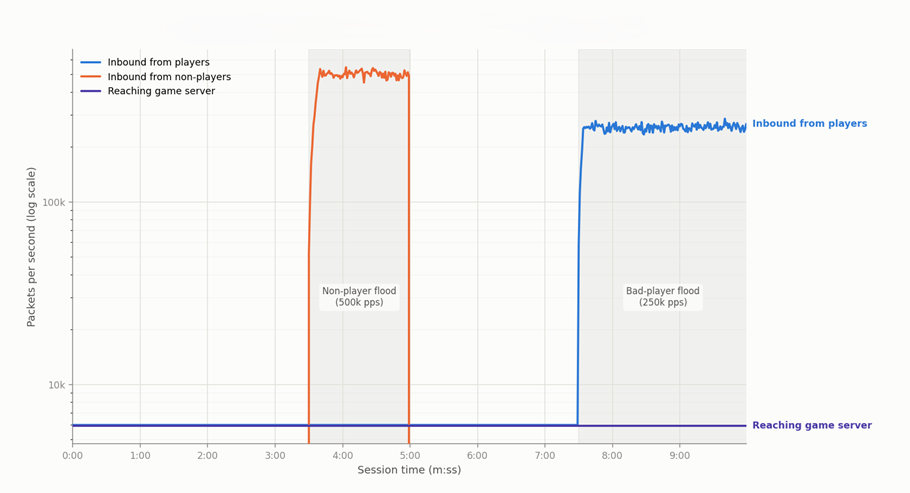
Figure 2: Impact of DDoS attacks on a game session with Player Gateway
The tradeoff is that Player Gateway requires a bit more integration work, which I cover next.
Prerequisites
Before you begin, confirm your fleet meets the following requirements:
- A Linux-based AWS EC2 Fleet or AWS managed container fleet
- Amazon GameLift Servers Server SDK 5.0 or later
- A location that supports player gateway (see service locations)
- UDP-only communication between your player clients and your game server
Set up Player Gateway
Integration centers on a single new API. To adopt Player Gateway, integrate your game backend with the new GetPlayerConnectionDetails API from Amazon GameLift Servers. The flow is straightforward:
- Call
GetPlayerConnectionDetailsonce a minute to retrieve up-to-date connection details, because proxies under attack might be replaced. - Have your client include the access token at the front of every packet it sends.
- Have your client stop using endpoints that appear impaired (not receiving return traffic).
These topics and sample code are covered in more detail in the Player Gateway Integration Guide. It also describes a tool that you can use to test if the integration changes have been made correctly.
Because the token is refreshed at a regular interval and removed before traffic reaches the server, the integration stays contained to your backend and client networking layer.
The final step to complete adoption is to verify that the PlayerGatewayMode parameter is set to Enabled when you create your Amazon GameLift Servers managed EC2 fleet or managed container fleet. This is described in more detail in the onboarding documentation.
Validate the integration
You’re ready to create a game session on your fleet and confirm that traffic is flowing as expected by playing the game. You can perform a deeper validation by examining the Player Gateway metrics provided for you.
To view player gateway metrics:
- Open the Amazon GameLift Servers console.
- In the navigation pane, choose Fleets under Managed EC2 or Managed Containers, as appropriate.
- Select your fleet.
- On the Metrics tab, view the Player Gateway section.
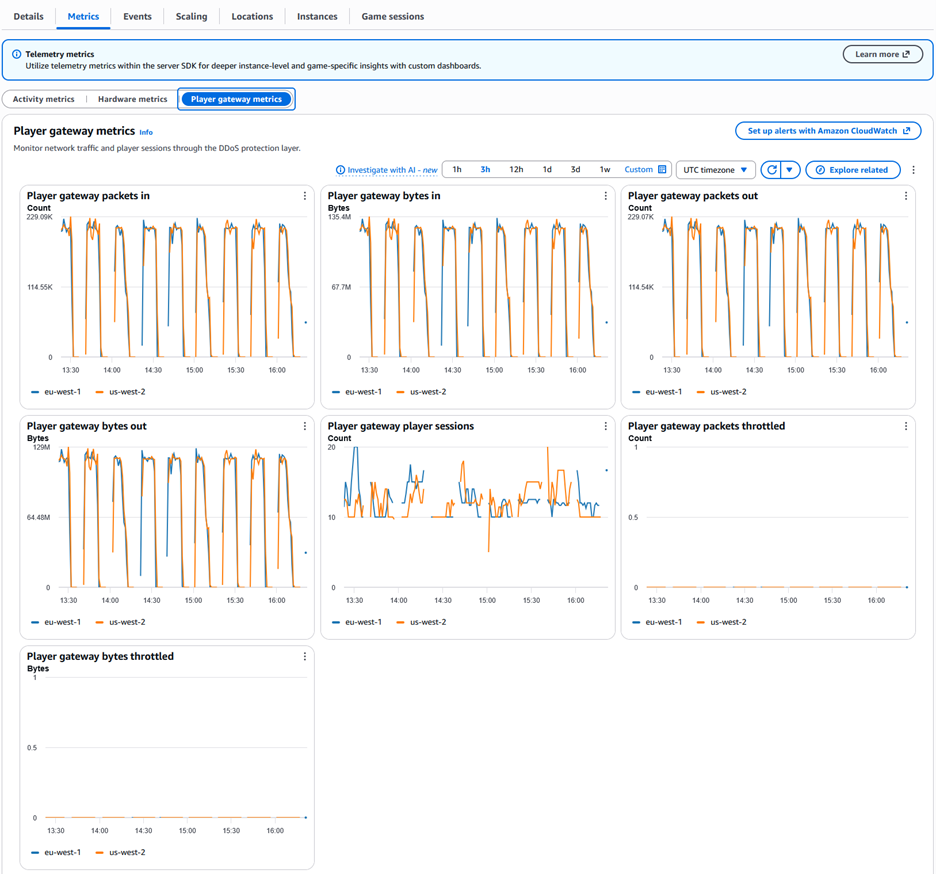
Figure 3: The Player Gateway section of the fleet Metrics tab shows traffic flowing through the system
The metrics shown in Figure 3 confirm that packets are flowing through the player gateway in a series of game sessions. Under normal circumstances, the bytes and packets throttled counts will be zero, but can rise in the presence of an attack.
Clean up
If you created any game sessions or fleets while testing Player Gateway, delete them after you’re done to avoid ongoing charges.
Summary
In this post, I showed you how to protect your game servers from DDoS attacks using two options available with Amazon GameLift Servers for no additional cost. Enhanced DDoS Protection gives you automatic, no-integration rate limiting and is a sensible default for any game. Player Gateway adds a layer of validating UDP proxies that can differentiate real players from attackers. These proxies also isolate players from one another’s attacks and keep your game server endpoints hidden. To gain these benefits, you need only a small integration effort built around the GetPlayerConnectionDetails API.
Choosing between them depends on how much protection your game needs. Many games start with Enhanced DDoS Protection. As their player base grows and they become more visible to potential attackers, they might adopt Player Gateway.
Contact an AWS Representative to learn how we can help protect your game and accelerate your business.