AWS for Games Blog
Best practices for Instant Play Demos powered by Amazon GameLift Streams
Instant Play Demos powered by Amazon GameLift Streams are a unique approach to marketing video games. Studios can use them to present a time-bound slice of gameplay to potential players without requiring downloads or installs by using cloud game streaming.
If you’re new to Instant Play Demos, here’s an overview of how they work:
- A studio initiates an Instant Play Demo campaign.
- The studio creates a demo build of their game using their game engine.
- The studio uploads the demo build.
- Amazon Web Services (AWS) stores the demo build in Amazon Simple Storage Service (Amazon S3) within AWS managed infrastructure.
- AWS creates Amazon GameLift Streams resources.
- An ad campaign is launched with a Partner Distribution Channel such as Twitch or Discord.
- Players view and interact with the partner ad, launching gameplay in the browser.
- After gameplay ends, the player purchases the game from the studio’s chosen storefront.
The following diagram illustrates this workflow. The game studio uploads a build from their chosen game engine to the AWS Cloud where it’s securely stored in Amazon S3. Amazon GameLift Streams then delivers the stream to a partner distribution channel, which directs players to a storefront to complete their purchase.
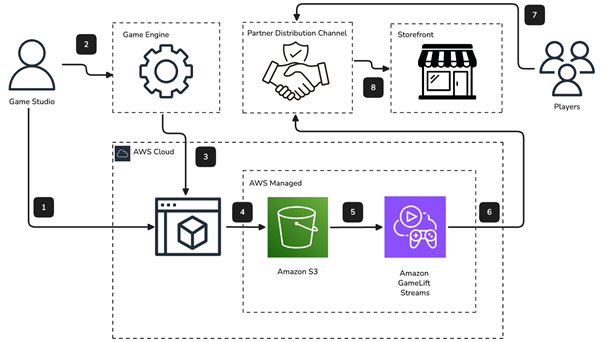
Figure 1: Instant Play Demo workflow diagram
To achieve the best performance with Instant Play Demo ad campaigns, it’s important to create a low-friction experience that showcases your game. This post will outline a set of best practices and guidelines that you can use to increase the conversion rate for your Instant Play Demos.
Eliminate friction before gameplay
Players have little tolerance for delays. Research shows that load time directly drives abandonment, with 32% of PC players reporting that they’ve stopped playing a web-based game because it took too long to load. It’s critical to reduce friction and create an experience that drops players directly into action.
- Minimize start and title screens: Demos should be free of logos, credits, and main menus that delay dropping the player into action.
- Remove tutorials: Demos should be playable with little or no instruction.
- Remove account creation and required sign-ins: Demo sessions are short-lived and should run without accounts or social integrations.
- Hardcode resolution: Demos run in 1920×1080 at 60 FPS. Hardcode these settings into your demo build profile.
- Settings and options menus: The demo UI should be simplified and avoid displaying these menus. Pre-configure your game with default settings to present the best possible user experience.
- DRM: Builds must be completely free of digital rights management (DRM) integration because those checks will fail in the cloud environment and block the game from launching.
- Minimize bootstrap sequence: Demos should be free of unnecessary scenes and assets and should use async loading to reach gameplay faster.
- Pre-create characters: If possible, demos should start with a pre-built character that showcases the game’s appeal. Don’t require the player to spend time in a character creator unless it’s crucial to the game’s experience.
Showcase your best content
Choose a gameplay section that:
- Is visually impressive within the first few seconds
- Is challenging, but not frustrating
- Demonstrates core mechanics immediately (enemies, movement, abilities)
- Doesn’t require context from earlier in the game
- Is self-contained enough to be enjoyable in a short session (15–20 minutes)
- Avoids dead-end states
- Spawns the player in a safe area
Your demo should avoid placing the player into immediate danger (active enemies, incoming projectiles, hazards), because players often need a moment to orient themselves in a new game. If your best content unavoidably starts in a hostile situation, implement a click to start pause screen that briefly explains what’s about to happen and lets the player begin on their terms. Spawning a player into combat they weren’t ready for is a poor first impression. They’ll die confused rather than engaged.
Ensure player state
Your demo should spawn the player with full health, and with the appropriate abilities unlocked for the demo zone. For example, if your demo begins in Zone 2, which assumes the player has a weapon from Zone 1, the weapon should already be granted in the player’s inventory. If players can travel backwards to earlier zones from the demo zone, ensure that your inventory systems are adjusted to avoid displaying interactables or pickups that have already been granted.
Separate the demo build from production
When creating demo builds from your game engine, employ a distinct build configuration (such as a Unity Build Profile) rather than conditionals scattered through production code. This gives you a clean separation of concerns with no risk of demo code shipping into production. This build profile lets your engineering teams iterate on the demo experience independently of your production experience, so you can ship only the scenes and assets required for the demo with the required quality presets pre-defined.
Launch mode considerations
Instant Play Demos supports two optional launch modes. The first mode uses warm compute resources where the game is pre-loaded and only launched when the player initiates a new play session. The second mode uses hot resources which provide near-instant play times. If your campaign will use the hot launch mode, it’s suggested that your demo start in a paused state that requires the player to interact with the game to begin. It’s also possible, but not available by default, to integrate an event through data channels that notifies your game that the player has connected. If you prefer this option, we will work with you to implement the proper data channel event handling.
Additional technical requirements and recommendations
The following technical requirements apply to your Instant Play Demos:
- Self-contained executable: Launchers aren’t supported.
- No kernel-level anti-cheat: EAC and BattlEye kernel drivers are incompatible with Linux instances and might block Windows instances. Anti-cheat should be disabled.
- No self-updaters: Disable auto-update mechanisms (launchers, patchers). Builds are immutable after being uploaded, and updates can’t be written to the instance.
- Session isolation: Each session must be stateless. Don’t rely on
PlayerPrefs, local files, or persistence between sessions. - Resolution and aspect ratio: The service will run at a fixed 1080p resolution. Your UI layouts and builds should target this fixed resolution.
- Call to action: Your campaign will prompt the player with your chosen call to action link when the demo ends. You shouldn’t include timers, storefront links, or calls-to-action in your demo build.
- Data channel and SDK integration: If necessary, games can receive real-time messages through localhost TCP (port 40712) for custom events or external triggers.
- Platform: Windows x86_64 executable (.exe) or Linux binary. Proton 9 and 10 are also supported for Windows games on Linux instances.
- Graphics API: DirectX 11, DirectX 12, and Vulkan (using VKD3D or DXVK on Proton) are supported. Ensure your build targets one of these graphics APIs.
- Environment variables: Up to 50 key-value pairs can be passed at session start using
AdditionalEnvironmentVariables. Use these for session configuration or feature flags. - Input support: Keyboard, mouse (with pointer lock), gamepad, and touch are passed through WebRTC. Configure your default input scheme accordingly.
Multiplayer game guidelines and recommendations
Multiplayer games face unique challenges in a streaming demo context. Keep the following items in mind when considering a multiplayer Instant Play Demo.
- As with single-player demos, you should strongly consider bypassing authentication for your multiplayer demo. If authentication is unavoidable, you can pass tokens using
AdditionalEnvironmentVariablesat session start and configure the demo build to bypass the authentication UI and consume these silently. Make sure that Amazon GameLift Streams IP ranges are allow-listed with your auth provider to prevent security flags. - Another option for Instant Play Demos for multiplayer titles is to consider a single-player demo version using bot matches, AI opponents, or scripted encounters. This approach eliminates matchmaking, server dependencies, and empty lobby problems entirely. Player versus player (PvP) games against bots present a better experience for a first-play demo than real matchmaking, which introduces skill mismatches and a hard dependency on live player population.
- Social features like friends lists, chat, party invites, clan systems, and other social features aren’t crucial to the goal of selling your game to players in less than 20 minutes. These systems should be removed or disabled for your demo build.
Conclusion
The best practices and guidelines listed in this post will help you to launch successful Instant Play Demos powered by Amazon GameLift Streams. Each game and situation is unique, and we would be happy to discuss your situation directly with you. Contact us to discuss launching an Instant Play Demo campaign for your game.