AWS Big Data Blog
Announcing in-place ZooKeeper-to-KRaft cluster upgrades for Amazon MSK
Apache Kafka 4.0 officially removes ZooKeeper. If your Amazon Managed Streaming for Apache Kafka (Amazon MSK) Provisioned clusters still run in ZooKeeper metadata mode, now is the time to plan your migration. Amazon MSK now supports in-place upgrades from ZooKeeper to KRaft metadata mode, so you can modernize your existing cluster’s metadata management through the familiar version upgrade workflow.
For more than a decade, Apache ZooKeeper provided dependable metadata management for Kafka, including controller election, partition state, broker registration, and topic configuration. With Apache Kafka 4.0, ZooKeeper is officially removed in favor of KRaft, an embedded Raft-based consensus protocol that handles metadata management internally. It brings those responsibilities into Apache Kafka itself, creating a more streamlined foundation for the continued evolution of Kafka. Amazon MSK has supported KRaft-mode clusters since May 2024, and all Kafka 4.x versions on Amazon MSK use KRaft.
With the in-place upgrade, you can retain your cluster data and metadata while Amazon MSK manages the control-plane transition. Your cluster remains available for produce and consume traffic throughout the process, with no expected downtime if you’re following best practices. By using the existing version upgrade workflow, the move to KRaft becomes a natural step in your cluster’s lifecycle. This prepares your cluster for Kafka 4.x and future Kafka releases.
Prerequisites
Before initiating the upgrade, review the following requirements to confirm your cluster is ready for the transition.
Supported source versions
Clusters must be running Kafka 3.9.x in ZooKeeper mode to use the in-place upgrade. If your cluster is running an earlier version, such as 3.6.0, 3.7.x, or 3.8.x, first complete a standard in-place version upgrade to 3.9.x. You can then initiate the upgrade to 3.9.x.kraft.
Kafka 3.9 is the bridge release for this transition because it supports both ZooKeeper and KRaft modes. To support customers through this migration process, Amazon MSK provides extended support for 3.9.x for a minimum of 2 years from its April 2025 release.
Client compatibility
| Requirement | Detail |
| Minimum client library | Apache Kafka client v3.0+ |
| Recommended client version | v3.9 or above |
| Connection strings | Must use bootstrap.servers only. Any ZooKeeper connection strings (the --zookeeper flag) must be removed before upgrade. |
The --zookeeper admin flag was deprecated in Kafka 2.5 and removed in 3.0. Before upgrading, update any remaining applications or tools that connect directly to ZooKeeper.
Pre-upgrade checklist
Before beginning the upgrade, confirm the following:
- For Standard brokers, the cluster must be deployed across three Availability Zones. Express brokers provide this by default.
- The cluster is running Kafka 3.9.x in ZooKeeper mode.
- Standard brokers expose direct ZooKeeper access on ports 2181 (plaintext) and 2182 (TLS). Before upgrading, validate that you’ve disabled ZooKeeper access on the cluster and none of your applications rely on these connections.
- Solutions using dynamic Kafka configurations that relied on ZooKeeper have been removed before attempting the upgrade operation.
- If you previously configured custom domain names on a ZooKeeper-based deployment using the dynamic override (
kafka-configs.sh --alteronadvertised.listeners), be aware that KRaft does not support this dynamic configuration. If you attempt to upgrade your MSK cluster to KRaft with alteredadvertised.listeners, the upgrade operation fails. - If you’re implementing your custom domain name solution on MSK moving forward with KRaft, we recommend our coinciding MSK release for custom domain name support by statically configuring the
custom.advertised.listenersproperty through theUpdateClusterConfigurationAPI.
- If you previously configured custom domain names on a ZooKeeper-based deployment using the dynamic override (
- The cluster has no under-replicated partitions.
- The cluster is running within per-broker partition limits for standard or express broker clusters.
- For clusters running above the KRaft brokers-per-cluster limit, you might need an additional quota increase. If you previously raised a quota increase for your ZooKeeper brokers-per-cluster, submit another quota increase for the KRaft limit before attempting the upgrade.
- The cluster has enough reserve capacity to support rolling broker restarts while serving client traffic.
- As a best practice, verify that monitoring is ready for the transition from ZooKeeper-specific metrics to KRaft controller metrics.
- After the migration, ZooKeeper-specific Amazon CloudWatch metrics such as
ZookeeperRequestLatencyMsMeanandZookeeperSessionStateare no longer available. - If you use Open Monitoring, Kafka also stops publishing ZooKeeper metrics. Plan to update or retire related alerts and dashboards as part of your migration preparation.
- After the migration, ZooKeeper-specific Amazon CloudWatch metrics such as
How the upgrade works
When you initiate the upgrade, Amazon MSK performs a managed, multi-phase migration:
- Controller quorum bootstrap: Amazon MSK provisions KRaft controller nodes alongside the existing ZooKeeper infrastructure. Both systems operate in parallel during this phase.
- Metadata migration: The KRaft controller reads the cluster state from ZooKeeper and writes it to the internal KRaft metadata log.
- Broker transition: Amazon MSK performs a rolling update and registers with the KRaft controller quorum. Data plane operations remain available during the transition.
- Validation and bake period: Amazon MSK verifies cluster health under KRaft, including partition leadership, replication state, and controller responsiveness.
- ZooKeeper decommissioning: After validation succeeds, Amazon MSK removes the ZooKeeper infrastructure and the cluster operates entirely in KRaft mode.
During the upgrade, the cluster enters UPDATING state. You can continue producing and consuming data, while Amazon MSK administrative API operations are temporarily unavailable until the cluster returns to ACTIVE.
Amazon MSK maintains a high bar for durability during the transition. It uses rigorous safety checks at each phase of the migration to protect customer metadata in both roll-forward and rollback scenarios.
Built-in recovery
Amazon MSK monitors cluster health throughout the upgrade. If it detects a condition that prevents the migration from completing, it automatically returns the cluster to its pre-migration state. No customer action is required during recovery.
The operation status changes to Reverting to pre-migration state while Amazon MSK restores the original Kafka version and reconnects ZooKeeper. After the cluster returns to ACTIVE, the describe-cluster-operation API provides error codes, failure reasons, and recommended remediation steps. You can use these to address the issue before starting the upgrade again.
How to perform the upgrade
The following steps walk you through the upgrade process using the Amazon MSK console. You can also perform these steps programmatically using the AWS Command Line Interface (AWS CLI) or SDK.
Step 1: Disable ZooKeeper access (standard brokers only)
Note: This step applies only to Standard broker clusters. Express broker clusters don’t expose direct ZooKeeper access and can skip directly to Step 2.
Standard brokers expose direct ZooKeeper access on ports 2181 (plaintext) and 2182 (TLS). Before upgrading, validate that none of your applications rely on these connections.
Navigate to your cluster’s Properties tab, choose Network settings, and then choose Edit ZooKeeper access.
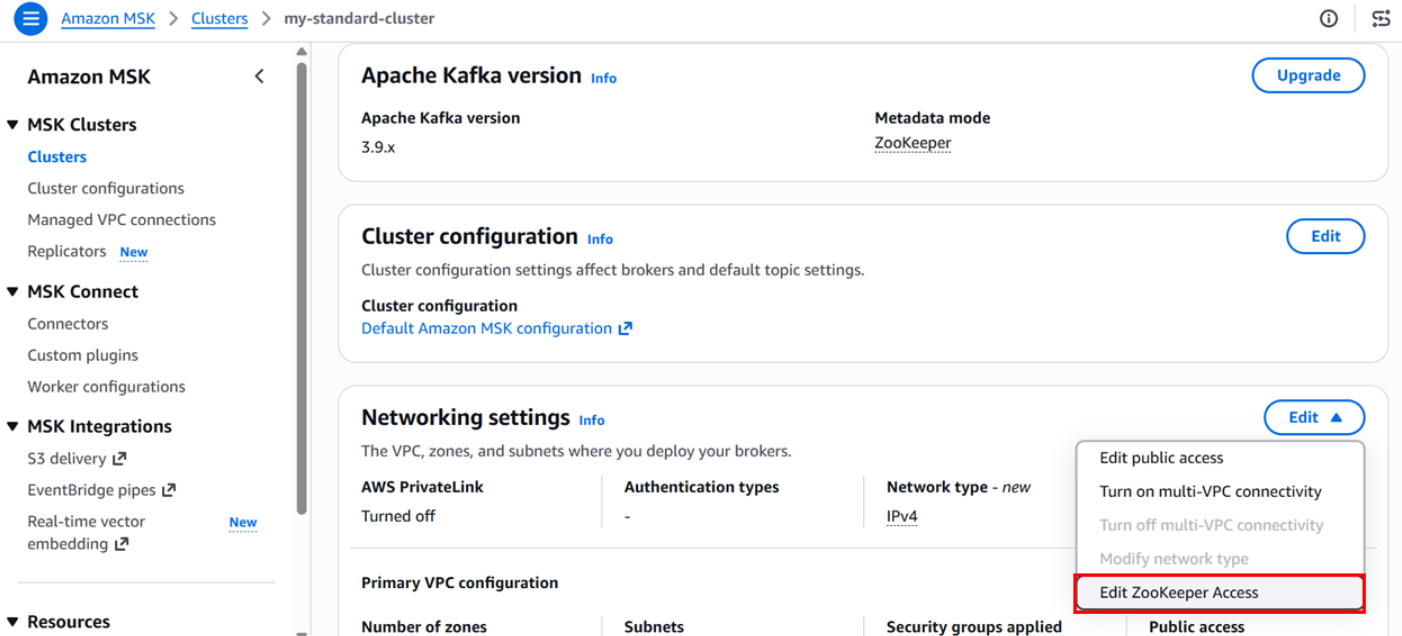
Figure 1: Editing ZooKeeper access from the cluster network settings
In the pop-up window, verify that ZooKeeper access is set to Disabled, and then choose Save.
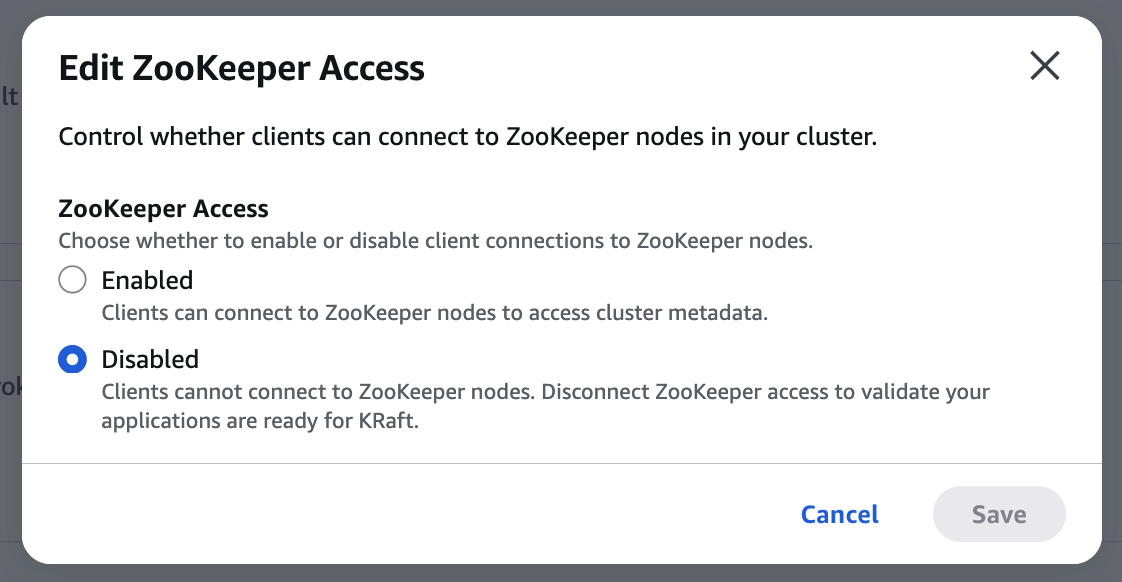
Figure 2: Confirming ZooKeeper access is disabled
Confirm that producers, consumers, and admin tooling continue operating normally without ZooKeeper connectivity. This step is fully reversible. Re-enable ZooKeeper access immediately if anything breaks.
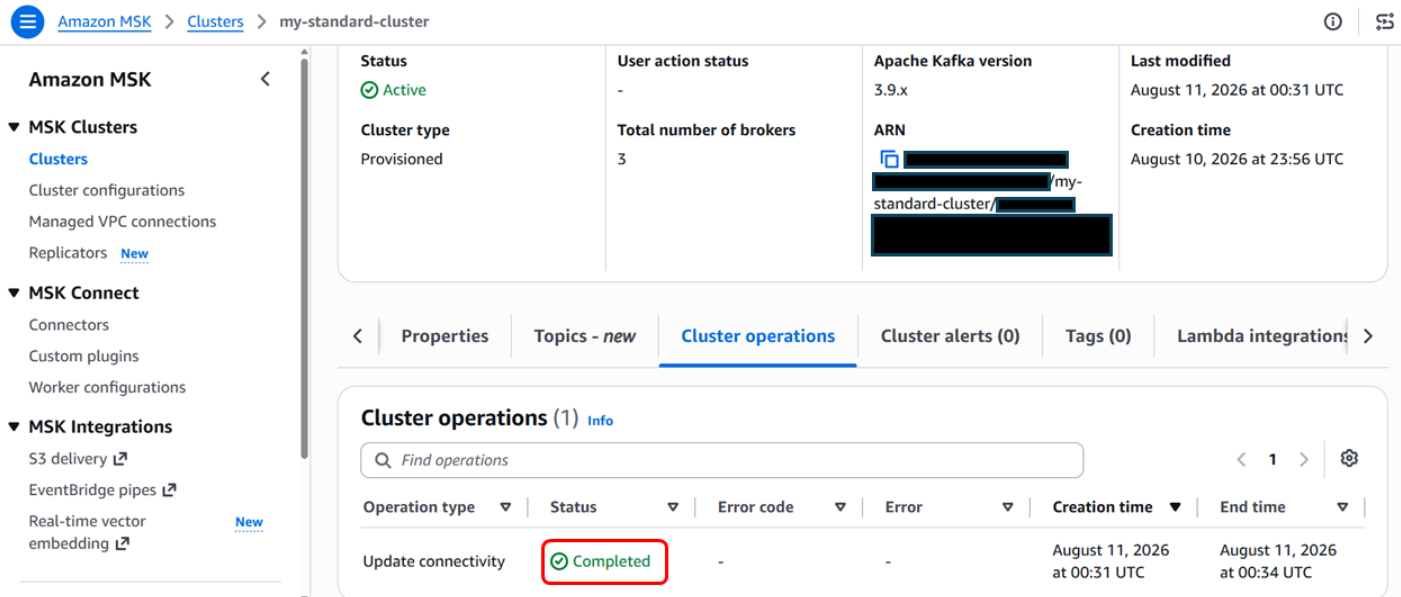
Figure 3: Verifying client traffic continues without ZooKeeper access
Step 2: Initiate the version upgrade
In the Amazon MSK console, under Properties, choose Upgrade in the Apache Kafka version section.
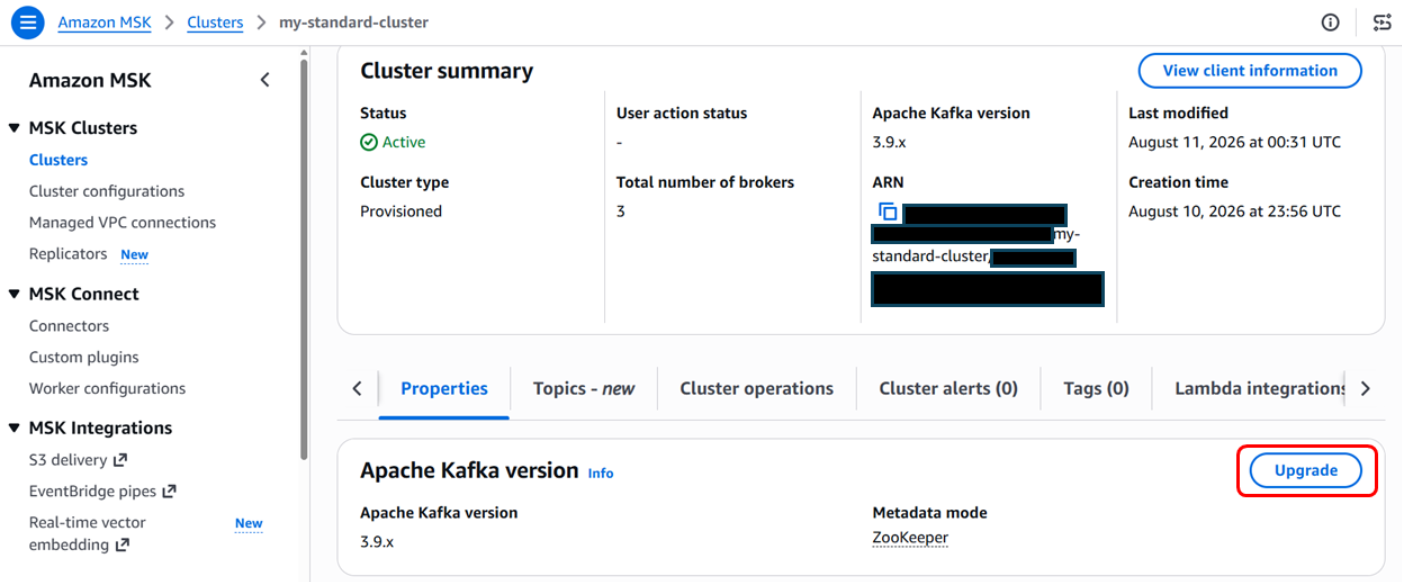
Figure 4: Starting a version upgrade from the Apache Kafka version section
Select your cluster and start a version upgrade to 3.9.x with Target metadata mode set to KRaft. Choose Upgrade.
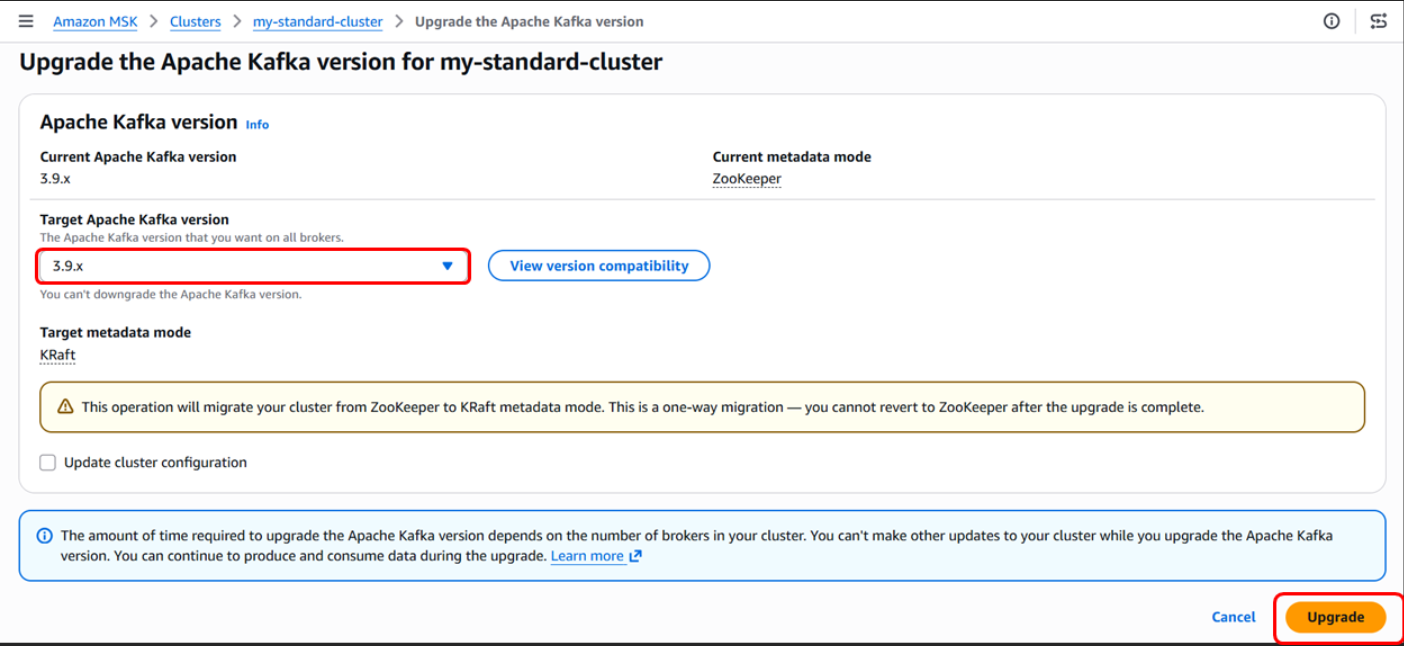
Figure 5: Selecting KRaft as the target metadata mode
You can monitor your upgrade progress on the cluster properties page.
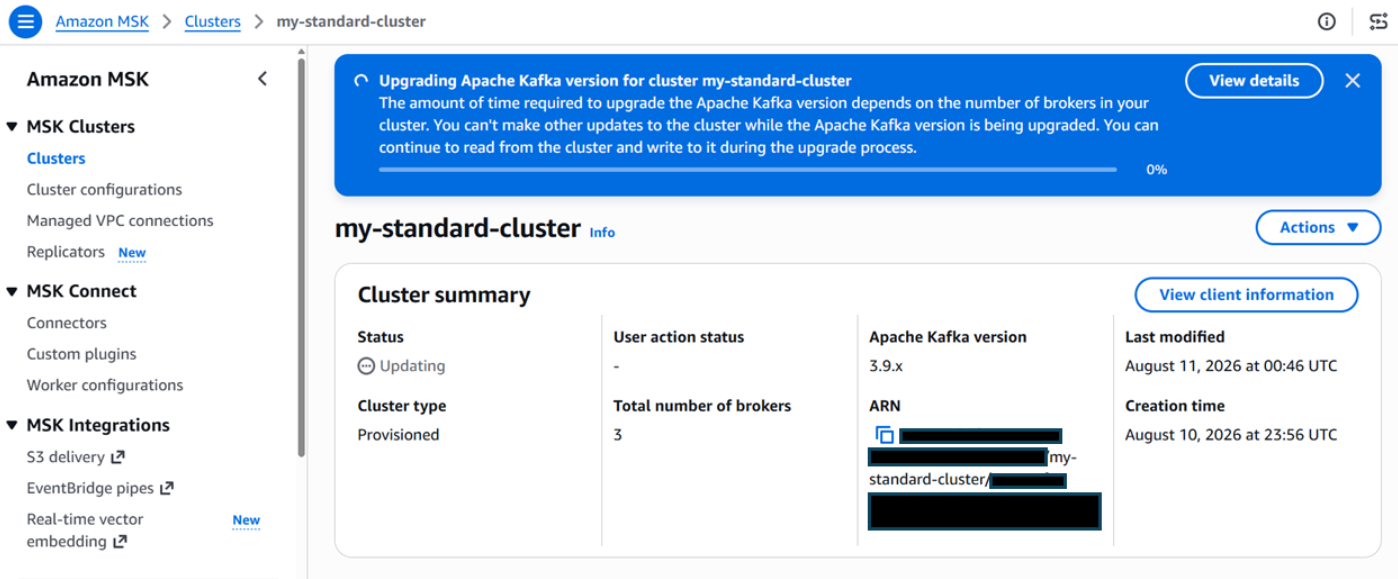
Figure 6: Monitoring upgrade progress on the cluster properties page
Step 3: Monitor upgrade progress
Track progress on the Cluster operations tab in the Amazon MSK console or with the describe-cluster-operation API.
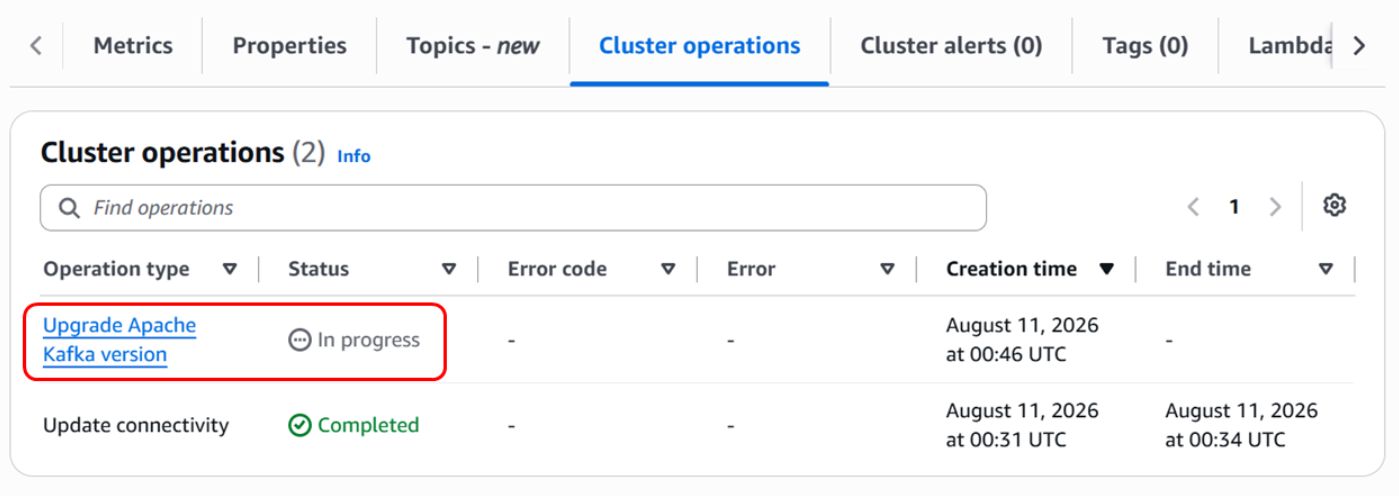
Figure 7: Tracking the upgrade on the Cluster operations tab
Step 4: Validate the KRaft cluster
After the cluster returns to ACTIVE state in KRaft mode:
- Verify that topics, partitions, and consumer groups are present.
- Confirm producer and consumer throughput aligns with pre-migration baselines.
- Update or disable any ZooKeeper-specific monitoring alerts.
- Update operational documentation and runbooks to reflect KRaft mode.
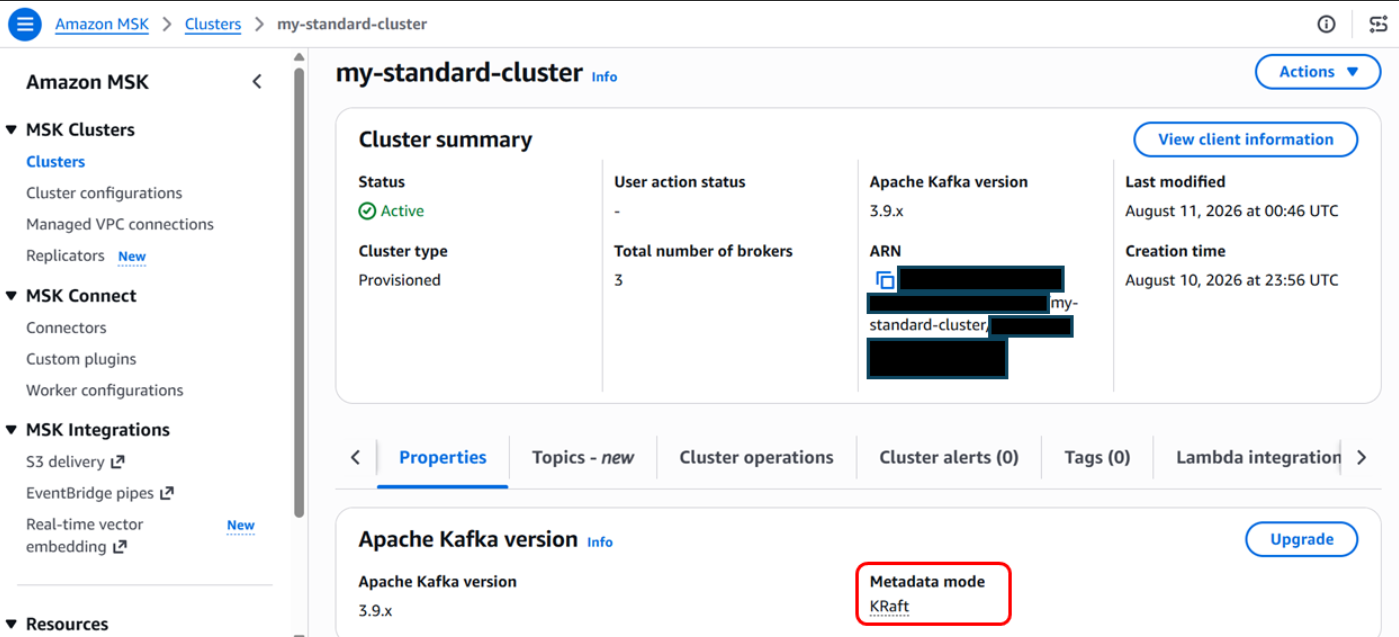
Figure 8: Cluster running in KRaft mode after the upgrade
After the upgrade completes, your cluster appears in an Active state with KRaft enabled as the metadata mode.
Get ready for the next generation of Kafka on Amazon MSK
The in-place ZooKeeper-to-KRaft mode upgrade makes it straightforward to prepare existing Amazon MSK clusters for the future of Apache Kafka. Beyond removing external metadata dependencies, KRaft delivers faster failover times and higher partition limits per cluster. Amazon MSK handles the entire metadata transition, rolling broker updates, validation, and recovery workflow for you. With the new in-place experience, you have a clear, streamlined path to upgrade on your schedule and unlock enhanced scalability and resilience.
For more details, see the Amazon MSK Developer Guide and the supported Kafka versions documentation.